
Outliner Selection With Mouse Improvement
Box Selection With Mouse
Although box selection feature is available in Blender 2.8 beta's Outliner Editor. But it has some limitation or problems.
The problem is that firstly, We have to press
B
button (which triggers box selection tool), then we can
click and drag
to selects or deselects items.
The simplest solutions can be to
mouse click and drag
for box selection. e.g. the feature is already implemented in 3d viewport of Blender 2.8.
This is already suggested at the blender official documentation page developer.blender.org/T58969 but, I want to extends this idea with more details.
Here can be the Suggested Controls Details

Idea In Details

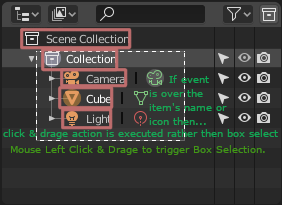
As shown in the image above, highlighted areas can be used for simply drag & drop items to another (existing feature) or for other purposes and empty space (other then highlighted areas) can be used for box selection.
And
Shift + Ctrl + Mouse Click & Drag
can be used for alternative to the
B + click & drag
action (also woks when mouse is over name or icons).
Ctrl + Mouse Click & Drag
works over on icons but not name (e.g. if moue is over name and event executed then item renames works as before).
Let me know if something is missing....
Selection in Action

Demo

Note:
In the demo above:
-
Mouse Click->Empty area(for deselecting everythings) is not working -
Ctrl + Shift + Mouse Click->Icon or Name(for triggering box selection likeB) is not working -
Ctrl + Mouse Click->Icon(for triggering box selects to deselecte some items) not working
Thanks...
5 Comments
+1 for this, making the outliner more usable was long overdue. While they're at it, they could sync selections between outliner and 3D viewport as well, I can't see any everyday situation where I'd want them to be 2 separate entities.
Also, maybe box select is obsolete as it is, now that rectangle select has been implemented quite well in the default blender keymap. Seems like one of those relics from the olden days people just got used to.
Outliner stuff is now going on in this post devtalk.blender.org/t/gsoc-2019-outliner-improvements-ideas/7185
Although, box selection overall is stupid consecpt in Blender Outliner (as their are only rows, not individual columns). But in some cases it could be use full. In in operating systems file explorer if the active view is details view (then their remains only one column) but box selection becomes hany again in this situation .
I think if Box selection must be converted to only mouse controls. then this is better idea (until another idea comes).
Also sync sellection in outliner and 3d view is necessory. When their are items selected in outliner then these items should be selected in 3d view.
I thinks always when for example selects item when rectangle selects, then the last item must be active.
Sync Selection in Outliner and 3d view And rectangel selection is very need for blender.
Box selection as the only way for fast select multiple items was most stupid thing as can be invented. Its cool in test scene with 10 box. Even maybe with 10 box + 20 spheres + 30 cylinders.
To understand that it's useless uncomfortable instrument just need to try to work efficiently with something like 768 object scene where you need to select 246 of them and you have only this stupid box, etc.
The only possible suggestion for box selection in Outliner - remove and replace it by something more efficient else.
Of course it's just IMHO based on my experience. Outliner does not need this " box type " selection at all. Box selection is for drawing some rectangle area to select/deselect something inside/outside this area.
But Outliner contain only horizontal rows. Here no lot of different horizontal and vertical items and we can select some of them by drawing this " box " and do not select some others. To select/deselect items it need only " clicks " and " drags " ( same as for visibility, etc. toggle icons ).