
Colorful Scene Layers
Instead of giving name to layer , it would be much helpful if we can add colors to the layers ,
more over it can fit in perfectly with current design , and it will be much helpful for everyone
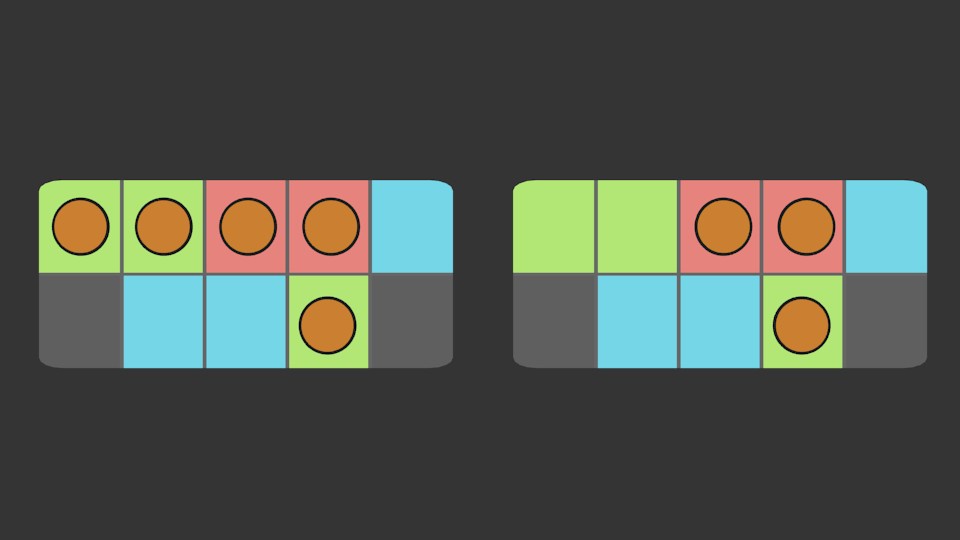
Instead of giving name to layer , it would be much helpful if we can add colors to the layers ,
more over it can fit in perfectly with current design , and it will be much helpful for everyone
10 Comments
afaik there is a big project going on (or at least being planned) that will overhaul the entire layer system, so maybe adding this now is not worth the effort
Yes, I agree, that the entire layer system should be rewritten. The limitations to 20 layers and no names are not good. There's an addon that gives you the opportunity to name layers and manage it, but still limited to 20.
Considering how easy it would be to implement (compared to an as-of-yet undocumented and mythical overhaul), it's probably ill-advised to make statements about the effort/value ratio of an idea like this.
Thanks for the link. Of course, none of the official GSOC projects for Blender have been announced yet. So while this proposal is in place and it's clear that it's being thought about, there's certainly no definitive timeline on it. Conversely, there will very likely be a 2.78 release that doesn't include such a layer manager (this proposal is definitely in 2.8 territory), minor enhancements wouldn't be a bad thing... especially for people who can't have the planned file version breakages when 2.8 comes.
May be you wish to update your proposal with this: we also need the same representation of layers on M key hitting. Now they are empty, but must be with the same dot indication and color, if the proposal fires.
This is more appropriate as a separate proposal.
Yes you guys are right .. after few thoughts it seems like it would be hard even to pull this up and also design vise and even confusing to know which one is selected ...
So one more option i thought ...
Creating a little button besides the layer panel which turns on the debug mode .. so then when we click on the layers .. it will not change colors but instead it will change the shapes of that orange little sphere inside it
It can be cycle through the few icons .. triangle round square and star ..
I hope that would be possible ..
much better for a short or a big scene
yup true... so helpful ^^