
Add Shortcut/Hotkey info to mesh select
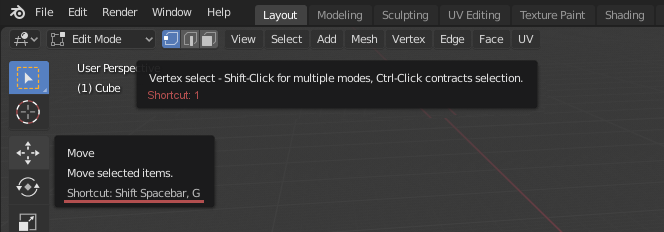
If you hover over the select options for you mesh it doesn't tell you that there are hotkey for those buttons. First I thought that this is a step back from 2.7* where you were able to use Ctrl + Tab to change the select mode.
By coincidence I saw the hotkeys on Blender Today with Pablo. The move button already has the shortcut info. Since 2.8 aims to be more entry level friendly I think it is a good idea to have a shortcut info here as well.
2 Comments
and same shortcuts that without the tools
I though about contributing to blender and add this myself - or at least try to.
I think it should be quite easy to add.
I think I have to search for that part of the code in
Maybe in *screen/, or *interface/ ? But I have no idea.