
Outliner Highlighting
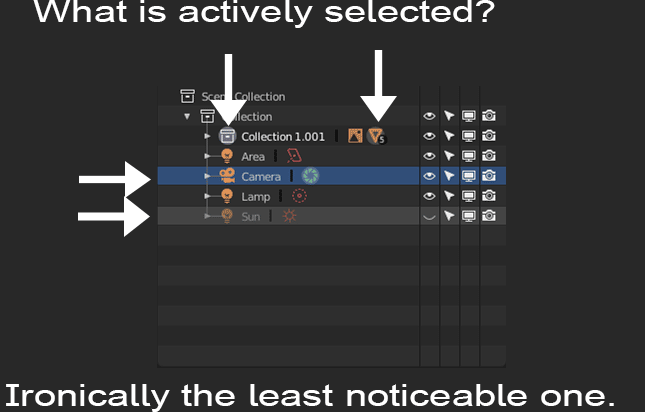
The outlier is fashionable as it gets but is functionality disconnected as the image shows. The blue “selected from within the outliner” highlight and light grey “last hovered over” highlight completely overpower what is actually selected and can be completely misleading. A quick little fix in the theme is to have no hover color or blue selected color but the actually selected object is still hard to find. So for the best results, I think a bit of code would be needed for this.
-
Is it possible to remove the light grey “last hovered over’’ highlight when the mouse leaves in the outliner?
-
When selecting something from the viewport, is it possible for the same blue highlight as when selecting it from the outliner?
-
Bonus, It would be awesome if when selecting something from the outliner, then that reflected in the properties panel. Yes, those specific material properties show up if already in the materials tab, but it would be extremely useful (especially new users still learning the tabs) if it also automatically selected the tab. For example, if in the outliner you click on a selecting a modifier, material, etc, then it would automatically show that modifier, material, etc. tab in the properties panel.
Thanks for reading.
1 Comment
exactly my thoughts. It is a small change but it will make life much easier. When I select something from a viewport I need to really try to spot what is selected in the outliner.