
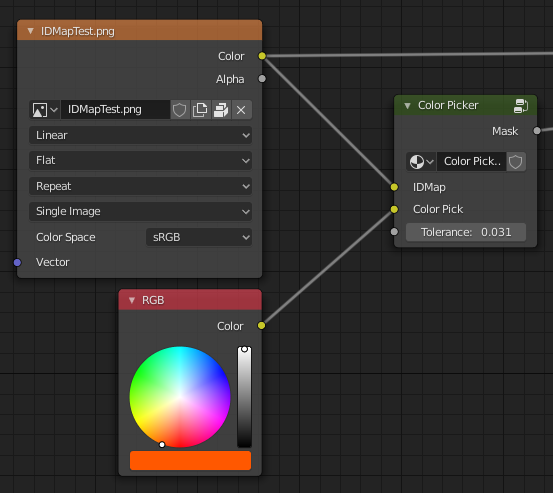
Color picker node by default! (Get a mask out of a texture & a selected color, full tree in the post)
I've seen that in the node editor there is no Color-picker node,
Its a basic node that from an input texture and an input color it makes a mask avoiding all colors except the picked one (With tolerance)
Its very important (if not indispensable) for workflows that involve an ID MAP (Like when texturing with substance painter or armor paint)
So I made my own and it'd be great to share it and have it by default with blender. cheers!
 Full tree Image
Example file (B3D 2.8b)
Full tree Image
Example file (B3D 2.8b)
5 Comments
Could you make a smooth one? For smooth masks
Thank you!
Where do I find that RGB node????
* @thinsoldier * You mean the "Input -> RGB" ? Remember you can always use the "shift+A -> search" within node graph
Note, I've set the tolerance to be a value between 0.001 to 1, and the graph takes the values of Hue and Saturation to compare with the given color pick