
Curve/Motion Editor in Graph Sheet (Source FilmMaker style)
##SFM Description
In SourceFilmMaker, it's
Motion Editor
displays all the channels curves like the Graph Editor. When you select a range of time, you get two selections, a hard selection and a falloff selection (Gray = unselected / Green = selected / Green+Gray = falloff selection)
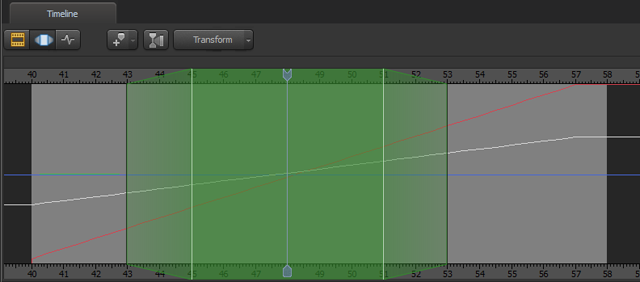 When you transform the bone/object, the values are offset 100% in the hard selection and the the falloff area is gradually offset less using whichever falloff-curve is set at the area: linear / dome / spike / or bell falloff, or in-out transition (linear / slow in / slow out / slow in+slow out)
___
It's second function is called the "
Floating Modification Layer
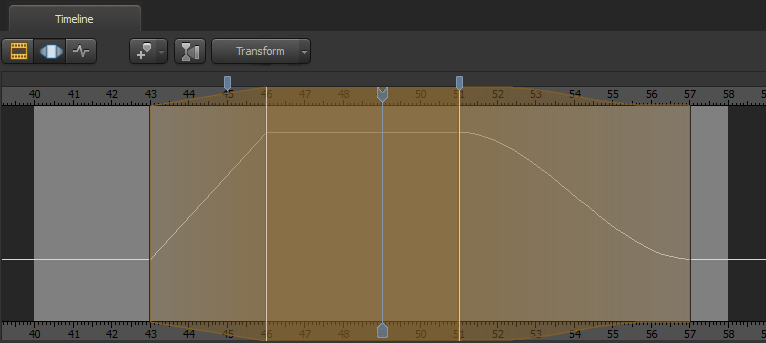
"; what it does is duplicate/overlay the curve selection with a separate/temporary curve/layer where you can keep transforming/animating without hard-overwriting the real curve animation (press escape to discard the layer).
When you transform the bone/object, the values are offset 100% in the hard selection and the the falloff area is gradually offset less using whichever falloff-curve is set at the area: linear / dome / spike / or bell falloff, or in-out transition (linear / slow in / slow out / slow in+slow out)
___
It's second function is called the "
Floating Modification Layer
"; what it does is duplicate/overlay the curve selection with a separate/temporary curve/layer where you can keep transforming/animating without hard-overwriting the real curve animation (press escape to discard the layer).
 Another feature called "
Procedural Presets
" perform functions on the curve using a slider to determine how much to apply it to the floating curve, for example smooth or past set to 1 would either perform one complete smooth iteration or overwrite the curve; with the slider, you can blend two animations or you can partially smooth it. (
click here for more presets
)
___
The way SFM works is it has the Motion Editor and the Graph Editor (and a clip editor that basically manages scenes).
The
Graph Editor
works like the Graph Editor in Blender where it uses channels+keyframes and interpolations.
The
Motion Editor
ignores keyframes and just works with the curves.
Another feature called "
Procedural Presets
" perform functions on the curve using a slider to determine how much to apply it to the floating curve, for example smooth or past set to 1 would either perform one complete smooth iteration or overwrite the curve; with the slider, you can blend two animations or you can partially smooth it. (
click here for more presets
)
___
The way SFM works is it has the Motion Editor and the Graph Editor (and a clip editor that basically manages scenes).
The
Graph Editor
works like the Graph Editor in Blender where it uses channels+keyframes and interpolations.
The
Motion Editor
ignores keyframes and just works with the curves.
The keyframes still work after using the motion editor but instead of it being the end result, it's applied to the motion editor's curve.
#How could this apply to blender? Without doing a 1:1 copy of the options or creating a separate window for curve editing, I believe there are some things that could be done to mimic the features/functions
Curve Selection Temporarily bake keyframes (1 step/frame-by-frame) then select a range once for the hard selection, then select a range again for the falloff selection. Have a parameter somewhere for Falloff-In and Falloff-out types, and values to change the frame selection numbers.
Floating Modification Layer Create a duplicate channel storing the current keyframes, then auto create/overwrite keyframes in the selection ranges.
Procedural Presets Buttons/Sliders in a panel that performs it's function and auto-create/overwrite keyframes in the selection
And then an apply button to remove the temp/backup channel and go back to regular Blender use or cancel to undo and go back to the backup. (curve selection could also perform the apply)
1 Comment
As an SFMer for 8 years, I can tell you that having the ME isn't all it's cracked up to be. The procedural presets in SFM are actually destructive on your animation. The Graph Editor is better for animation, and, unlike SFM's Graph Editor, some of the "procedural" presefts work in Blender's Graph Editor.