
Choose among multiple external image editors to edit textures/projections
It’d be great to quickly open textures from within Blender with the best suited external image editor for the current task - whether it’s for painterly/artistic textures, classic retouching or pixel art.
Blender already supports configuring a single image editor for external edits.
I’d appreciate it if this gets expanded to a choice of multiple image editors.
A choice among the configured image editors would also be useful for projection painting („Quick Edit“).

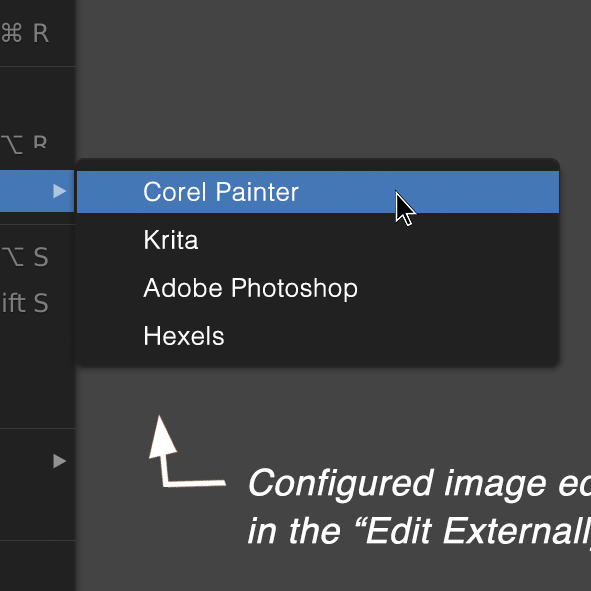
 Mockup 1&2:
The image editors should be offered in the „Edit Image Externally“ menu item and in the „Quick Edit“ Button (for projection painting in a 2D editor).
Mockup 1&2:
The image editors should be offered in the „Edit Image Externally“ menu item and in the „Quick Edit“ Button (for projection painting in a 2D editor).
 Mockup 3:
How to configure multiple image editors in the Preferences. (The layout of the UI module for multiple paths is inspired by Settings->Save&Load->Excluded Paths.)
Mockup 3:
How to configure multiple image editors in the Preferences. (The layout of the UI module for multiple paths is inspired by Settings->Save&Load->Excluded Paths.)
2 Comments
More options for different type of image editors for different style or task to switch around would be great.
Similarly, such a menu option would be nice when using the file browser, opened via the Shader Editor, Image node browser button. There is an "External" context menu that gives open/preview/folder, but there should be an option that at least uses the preferences for Image Editor.