
Color Ramp IMPROVEMENTS!
Hello everybody! To my opinion, the Color Ramp node could be improved in several ways for a better UX, I used the Gradient Map tool in Photoshop as the main reference:
1- ADD A NEW COLOR STOP DIRECTLY ON THE RAMP _Instead of clicking every time on the " + " icon, you can just click on any part of the ramp where you want a new stop, and it will automatically appear. imgur.com/a/nPQFHS6
2- REMOVE COLOR STOPS BY DRAGGING THEM _Again, instead of going to the " - " icon, you can drag the stops out of the ramp to remove them. imgur.com/gallery/HU9oU1q
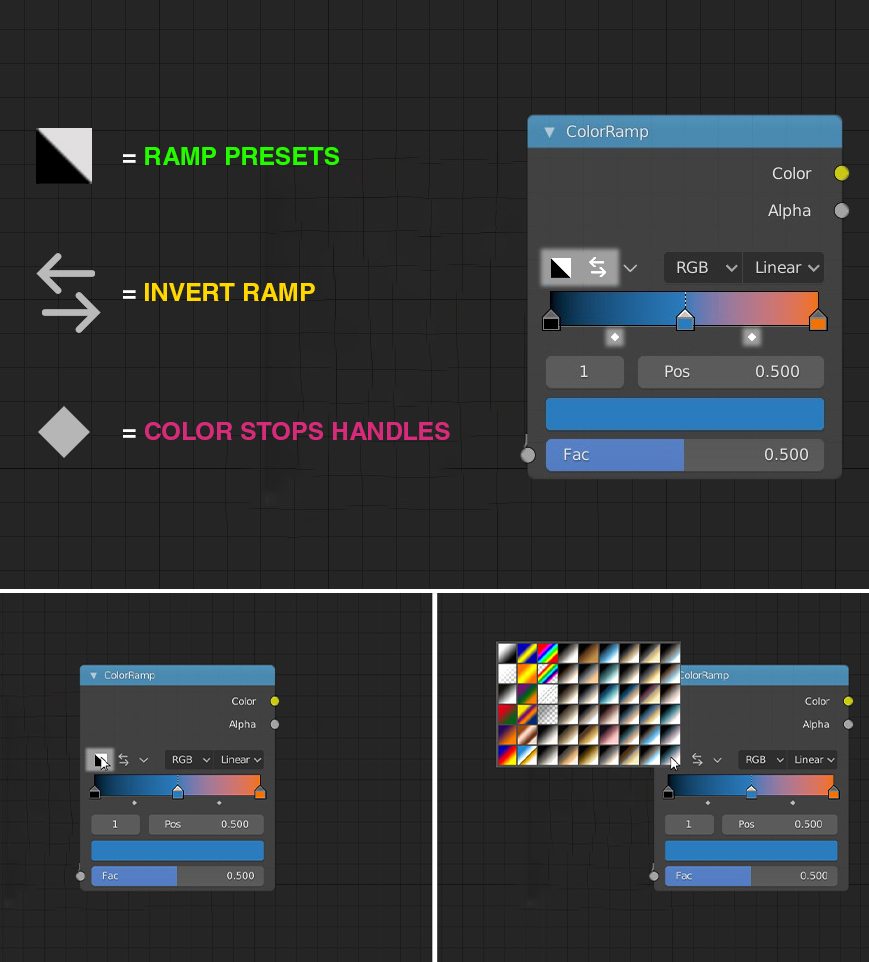
With this first 2 changes, the " + " and " - " icons wouldn't be needed anymore, making space for two new icons listed below.
3- CHANGE COLOR BY DOUBLE CLICKING ON THE STOP _Double-clicking on any stop makes appear the color picker. imgur.com/gallery/BwNSf6b
4- BETWEEN EVERY STOP THERE IS A "HANDLE" _I don't know exactly how to describe them, but I see them as small handles, right under the ramp (or maybe directly inside), that are used to change the "mid-point" between two color stops.
5- EASY TO FIND "FLIP COLOR RAMP" _Instead of being in the dropdown menu, Flip ramp should have its own icon in the node.
6- COLOR RAMP PRESETS" _An icon in the node that brings a pop-up menu with a bunch of preset ramps, and the possibility to save our own presets.
15 Comments
I don't know how much intuitive this is. I struggled the first time using Maya to add stops because I couldn't find a button to do it. I just needed to click on any part of the ramp! But there wasn't any visual cue to do that :(
Maybe there could be some sort of tooltip at first whenever you position the mouse over the ramp? Same for removing the stops.
Just my two cents.
* @Andy Cuccaro * That makes two Of Us.... Where there is no Button, There is no hope.... (Well, At least when beginning)
* @Andy Cuccaro * Personally, when I started using Blender clicking on the ramp was the first thing I tried to do, and that's a type of behavior that gradients share among many software (Photoshop, After Effects, Cinema 4D, Maya...). So, from an "industry standard" perspective, I'd argue it's more intuitive to click directly on the ramp, but I'm not against visual cues that can suggest that.
A mouse-over tooltip could be the solution, as well as keeping the + and - icons but implement the first two suggestions. I still believe that functionalities like flip ramp and distribute stops deserve their own icons more.
* @David Vernaglione * Yes, from an industry standard makes sense. But it should have some visual cue in order to be first-time-user friendly.
I vote for Not Preset.... But a Random Generate RampButton + Load Your Saved Preset or LOAD RAMP FROM OTHER FILE
* @Amitrakshar Biszz * In the moment we'll have the ability to save and load our own ramps, I can definitely pass on default presets! Regarding loading ramps from other files, I'm confident the Asset manager will solve this, I think that the appending system has become quite obsolete.
* @quarkINatom * I vote for few pre saved presets. That's the way how you can work very fast. You load the preset that is closest to what you need and then edit it. No need to go through that hazzle to save your own ones when you are working with something important.
Yes. People have been asking color ramp improvements for years. I think eventually we will get some improvements.
Actually it would be interesting to use the world output in compositor, when having the alpha enabled. This currently isn't working whit shadow catcher.
It would be very helpful to have independent interpolation for each stop
Nice concept, even if its a great node already!
And for the Future of course : A Color input for every Stop ;-)
+1 esp. for presets
+/- button still needed in case when stops are very dense. {attachment 33304117jpg} The same for position and color indicator.
But yes, it would be nice to have ability to double click to stop.
Drag is already used for dragging. So I would prefer hotkey for deletion.
I think it would be nice if a color step had also a input for the color (ea yellow dot on the left side)
For me more interesting yet is to have the hability to input textures on color stops, instead of bare colors, or input the 'RGB nodes do we could control it better.