
Link Material Viewport Display color to actual material color
DISCLAIMER: This relates to Workbench engine only.
The idea is to use the same material parameters to define what will be shown in viewport as default, with the option to override and choose a custom color (which would take the user to the same behavior as it is today).
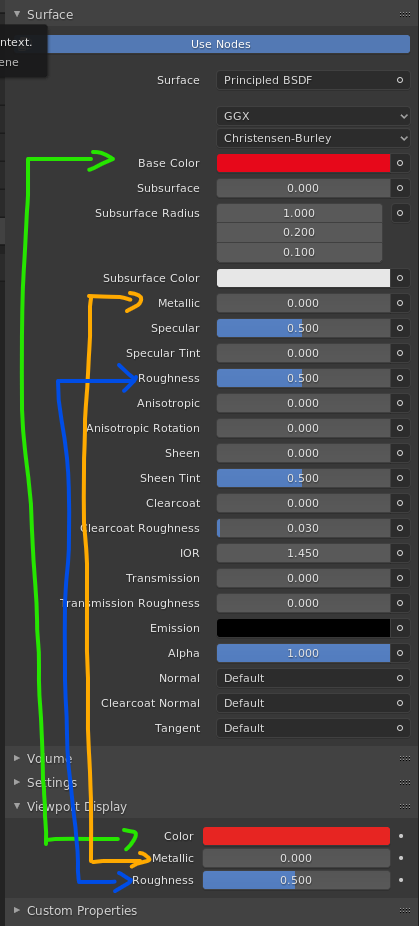 Why? Well, I think it is logical that the user would only want to see a custom color from the material as exception, not rule, right?
Given that Blender is now trying to be friendly to new users, it shouldn't make them rant on "WHY AREN'T MY D*MM APPLES SHOWING RED?"
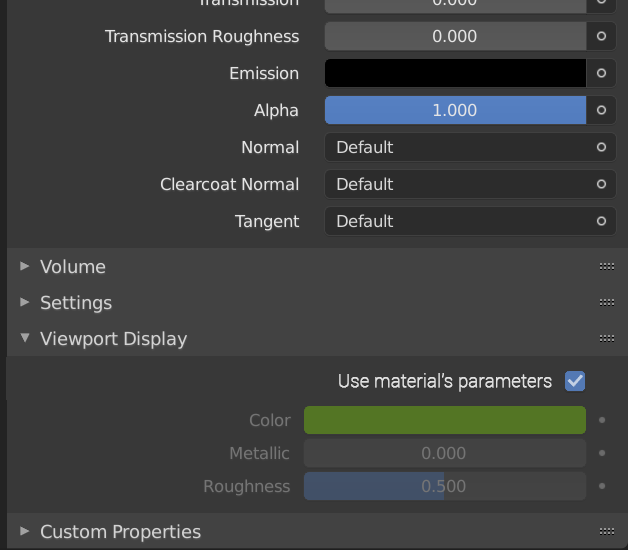
Here is an UI idea made by the blenderartists user aleksi1 . blenderartists.org/uploads/default/original/4X/0/7/2/072079d9ee221697f70f2a0f9967e84d62bff604.png
17 Comments
If you have a texture or a procedurally made texture plugged into diffuse, how does it know what to display? Does it average the color?
* @daniellapalme * It could be a great idea, but I believe is pretty hard to code something like that, right?
I guess it could just read the Color parameter of the base node. Anything more complicated than that, just override the function and pick any custom color you want to be more accurate.
* @daniellapalme * it could just disable the checkbox(grayed out) and use viewport display color since Workbench doesn't work with nodes, it's just for aesthetics .
We need this, you can't imagine how many times i wanted both to match and i had to scroll and drag/drop every single one of them and doing it in every project is driving me crazy.
Yes please!!!!
Yeah but only if this is an option, like a checkbox next to it : "linked to material" or something like that. Its a good thing too if those can remain separated in case where you want to organize your scene in a very specific way
* @Shimoon * Yeah! That's what the "Use material's parameters" checkbox on Aleksi1's UI mockup would stand for. And it should be Material based, of course, so you can chose which ones are going to use custom color representation.
We're trying to hash this one out too. community.osarch.org/discussion/2106/drive-the-viewport-display-color
Would be nice.
Not quite how it should work, i think. Materials should be node groups, just like geometry node trees are. So, the viewport display color should just be one input of the material output node. You could then connect any color to it. Be it the same as the shader or not.
Since this can only be a singular color, it would just average out textures to a single color if a texture is plugged in there.
This needs to become a reality!
I wished for the same thing on other formus. And what is sad that this idea is not even a new feature. Is: Display objects solid with GLSL material from old 2.79. Why they took it out? It was cool, fast, and eating no more resources than RANDOM Material ...
I think that that is a great idea I was just wanting that feature the other day for an image texture!
* @creeperjacob8 * For textures, you can use the texture mode.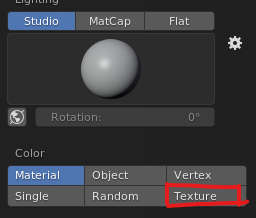 .
.
I have the same IIIFGIII concerns, although I'd like this if a solution comes up. I also like the UI mockup, simple and understandable
* @ Lsscpp * Hmm - I was wrong. For wireframe used object color.
This color separation have sense in case if user want to organize scene models visually without changing actual materials. For example to set few objects as red all other as black.
But it stil a question what to use as color override and how to set/change it if inside material there is no just color but some nodes input for base color. Maybe is such situations this checkbox just have to become inactive and even if it been enabled it should stop working if user conect something to base color input.
Viewport color can be used for example as wireframe color, etc. Material base color can be some texture or even some complex node structure otput so what you expect to see as wireframe color in such cases?
* @IIIFGIII * I think it could always keep the base color of the shader node, regardless the inputs (unless it is something simple like a RGB node?).
It doesn't need to try to emulate the result of complex nodes. It's not supposed to be render-accurate. For that, we still have LookDev and Eevee. And if you want to see textures, there is a "Texture" mode in Workbench menu.
If you think about it, today you still cannot simulate what should be an accurate representation of complex nodes, because you just have 3 parameters to customize: Color, Mettallic and Roughness.
The ideia is just to automate that by "guessing" the color and specular via link to main shader node parameters. Just like a starting point for simple setups.
But, if the inputs nodes are giving a result completely different from the shader base color, just uncheck "use material's parameters" and pick a custom color of your choice, as it is today :)