
subdivision surface difference between levels viewport and render
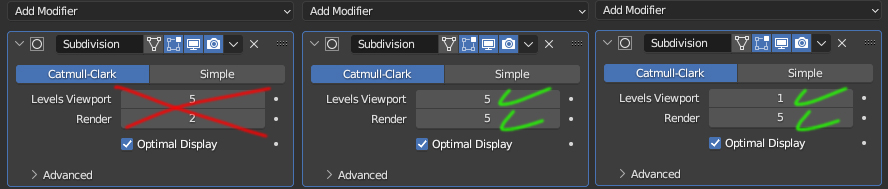
We have a production company, where we hire freelancers to model some products. One problem we have been following is with the subdivision surface, freelancers end up sending us the model with the "levesviewport" tab of the subdivisions larger than the "render" tab, causing problems at the time of rendering and wasting time for those who are finishing the work. Well, I don't see the need to have a lower value in the "render" tab than in the "levels viewport" tab, but just the opposite. I think a simple program so that the "render" tab always follows the highest value placed in the "levels viewport" tab would fix the problem. The same thing wouldn't have to happen if the person changed it to a smaller number in the "levels viewport" tab than in the "render" tab.
6 Comments
... or you can run this script to do the job ;)
True in most cases sometimes its useful to be able to reduce the render Subdiv and not the Viewport that removing the feature for useability might not be the right answer. An alternative that I think would help solve your issue while also just being a great feature would be to have a global override for this setting under the perfomace header in the Scene Settings ( i.imgur.com/9OKDbqP.png ) To control globally the Subdivision levels. Additionally it could be here your idea could be added too with an option that limits the Viewport SubDiv Level to not exceed the Render Subdiv level. calling it "Cap View to Render" or something.
In the meantime something that might help you out when dealing with these situations outside of altering your breif to freelancers is that if you hold "Alt" when editing any setting or value it will change that value across all selected objects. So if you have Multiple Objects with a SubDiv, with all of the objects selected, hold Alt (or Option on mac), and click on the field you wish to change. In this case the Subdiv level. Now you can release the alt key and type in the value you wish it to be and press enter. Now all selected objects with a Subdiv modifier will have its settings changed to be the same. This works for any shared settings an object might have. i.imgur.com/Gsv0CkL.gif
If you run into an issue where this does work, check your User preferences and make sure "Emulate 3 Button Mouse" Is Disabled as this overrides the "ALT" keys behavour. i.imgur.com/n8vOmMZ.png
Isn't the Simplify setting in Render pannel already working as a global limit ? LE: Just for fun I wanted to see if possible to use drivers to cap vieport sdiv limit to renders. You can also save to startup file to make it permanent.
Thanks for the feedback, but none of it solves the problem I mentioned. In complex files, different types of objects with different levels of subdivision are used. The question here is, why would someone need to make the subdivision larger in the viewport than in the render?
The Reason its seperate isnt because someone might use it in a workflow its more to save on crashing. The View port can handle rendering alot of geometry so if you want to check out your model at is smoothes of smooth while working on it you might crank up the viewport subdiv. But then say you forget and then hit render. Well then you have to go back dial back down the setting once its finished lagging out. This is why the behavour your wanting isnt in blender by default. Its for useability reasons, the same reason subdiv has a soft cap of 6 when freely scrolling the slider.
Honestly the best solution to your problem right now is to request this explicitly in your breif you send to you freelancers and if they dont send the files correctly request they fix it and resend it. Make it standard practice in your pipeline. It might seem like extra hastle but im sure you know by now its not. say you have 10 artists all doing the same thing, its easier to have 10 people fix 2 or 3 files than you or one other people have to sort out 30+ files for the same issue. Additionally especually when working with freelancers, often times they are less seasoned on the professional side of things, either they are hobbiests or Jr-mid level, for those in particular its so good for them to learn quality control and to be mindful that their submissions are upto scratch as it will better their workflows and for the Jr's this is exactly the kind of guidence they need to set themselves up for carrier moving forward.
Blender offers a lot of tools and useful features but maybe your problem is better solves outside of the software at least for now.
Honestly, it didn't convince me. I see no reason why the subdivision of the render tab should not increase along with the level viewport tab. But I will continue to encourage people to pay attention to this.