
Make the Principled BSDF node more beginner friendly
Hello! (First time posting here, so please let me know if I'm formatting this in a weird way)
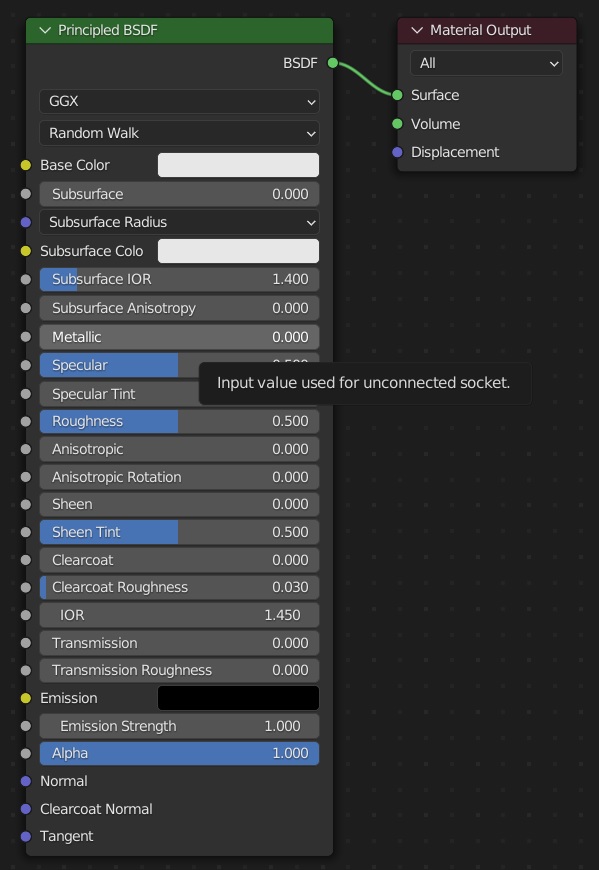
I often find myself scared of using the Principled BSDF node in the Shader Editor, because I still don't know what all the settings does. This node feels like a fundamental node in Blender, because it's the default node for any new material. Yet it consists of a comprehensive list of advanced words that point to specific shading properties, without any further explanations. I can imagine this is overwhelming for users discovering this node and trying to understand it for the first time. I am not a beginner myself, but I still feel that this node could benefit greatly from any sort of explanations.
Suggestion: Add meaningful mouseover text! Currently, hovering the mouse over any of the sockets in the node only displays the text: "Input value used for unconnected socket". This feels unhelpful, and it's the only text shown on every single socket in the node. It almost feels like a bug.
Some inspiration: Look at how great the mouseover text is in the smoke simulation settings! This feels so useful for learning smoke simulation faster, and I believe the Principled BSDF node could benefit greatly from something similar.
The Blender Manual has fantastic descriptions for these sockets already: docs.blender.org/manual/en/latest/render/shader_nodes/shader/principled.html
I have never written a line of code in my life, but I still want to help. Is there any way a non-programmer idiot like me can simply copy the text in the Blender Manual become and add it as mouseover text in Blender (without giving anyone else a bunch of extra work? I can imagine the right person could add this to Blender in a heartbeat)
TL;DR: The Blender Manual has great info about all the features in the Principled BSDF node. Current mouseover text is unhelpful. How can I help?
4 Comments
I think the title of this proposal should be: "Please improve tooltips for Principled BSDF node" as the proposed changes wouldn't affect the node itself.
I think tooltips in general need a lot of aattention. ZBrush's Tooltip explanation system is a good example as it's the best way to counter their weird UI people have so much trouble with.
If you really want to help in code then you could ask over at the Devtalk forums. They will only send you back here if you ask for features without willingness to do something yourself. :)
Please change the title as SpookyDoom suggested.
The tooltip system for geometry nodes was implemented not too long ago: developer.blender.org/D12607
But as far as I know, shader nodes are coded differently, so adding tooltips for them will not be as easy as just adding a few lines of "description" function calls...
hi, if its possible put video as image like " gif but no a gif format " to be readable that's happen to me