
Mark Collection as Asset like Append Collection (not like instancing!!)
Hi. when a collection marked as asset and then the collection imported to the scene, actually the imported thing is an instancing of the collection and that is not editable just like before marking as assets.
Here is my original collection that I marked it as asset:
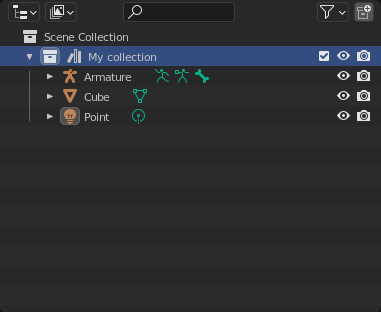
And when I drag and drop it into my scene it changed to instancing object:
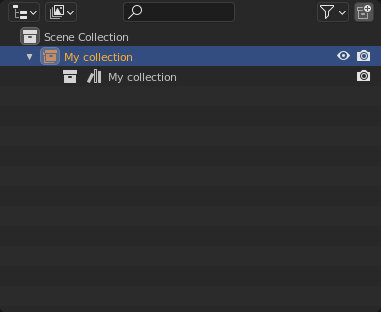 As a result I can not edit my Collection like other objects in Asset Browser (when imported in scene)
2 Comments
When working with assets from another file, In the top center of the asset browser there is a setting where you can choose to Link (creates an instance from collections) or Append (actually adds all objects in the collection to your scene)
Please voice your concerns in the Collection Asset feedback conversation.
If you don't have a lot of available hard drive space and you work with large assets, it's a good idea to use Linked Collection Instances because they don't increase the size of your scene file.
It sounds like you want complete duplicates of the collection when using assets from the Current File .
You can right click in the outliner to Duplicate the collection completely. Or use Duplicate Linked to have the new objects share the same mesh data as the original objects which saves file size. Or drag from the Asset Browser to make instances and then ctrl+A the instance and use Make Instances Real and activate the parent option.
I think this may actually be a bug report. The top center link / append selector in the asset browser does nothing on any of my installs (currently 4.1, but I'm not sure it ever did anything). I have all my assets in a single library which is set to "Append" by default.