
Edit Mode Deformers (destructive) - Bend, Taper, Twist & More!
I'm a 3D modeler, so nothing fancy or nodes oriented here just some additional destructive edit mode deformers to speed up modeling and block out. We've got sphere cast and shear, but how about adding Bend, Twist, & Taper? For bend, I recommend looking at the way Kushiro's addon works.
Those three should all be pretty self-explanatory. Current method involves using and placing 3D cursor and using proportional editing, or jumping out of edit mode to object mode and adding a modifier. But it could be much faster with a little UI love. They could also be a bit more flexible with the option to use selected faces and proportional editing.
Bonus round/wishlist:
- a quick warp lattice (creates a temporary lattice) with definable subdivisions per axis. Do the warp on the selected faces or the whole object and hit escape/enter to confirm - done!
- Planar clip - could either be a cube projected from x,y, z, or an arbitrary axis that cuts the geometry at the interior edge.
- curve deform similar to the curve deformer. Creates a curve with an arbitrary number of control points projected from the center of the bounding box face in user-selectable x,y, or z axis.
- Add the other cast modifiers (I'm showing cuboid here but cylinder would also be useful) possibly just change "to sphere" to "cast" with options.
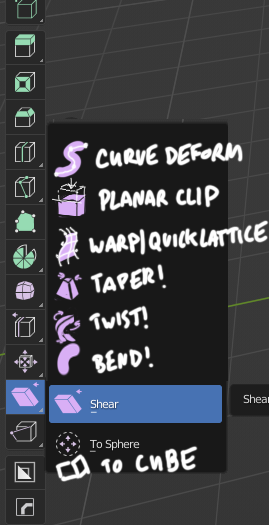
I want to warp my polygons with no remorse freely. Who's with me?!
5 Comments
To be honest, I find "Active tools" to be a completely unfinished and abandoned part of the blender UI. As is, it's simply an inferior, slow way to use tools that can be accessed quickly on the keyboard. I find no reason to use it at all as it is now. But maybe with more attention to them and more tools such as this, it can become something.
They are basically just variants of the classig transform gizmo applied to operator tools. It's mostly great for graphics tablet users or beginners but it's about it IMHO. Operators are faster to use as is and more versatile most of the time.
Btw, what's "Planar Clip" and how does it differ from "Bisect"?
It's very similar, and could be excluded. Bisect works by drawing a plane by a line, planar clip would work by modal axis (could select local, global or view based projection). Similar to the modal on shear but with arrows. I find it helpful to be in 3d perspective view when clipping, and it would shave off a second compared to bisect. Alternatively, it could function similarly to the zbrush clip brushes (smashing the geo down on an axis to a specified plane) but I don't think many people would like or need that behavior. Honestly, it's not a deformer, and should probably remove it from this request.
你说得对,我这就去开发它~