
Display as Xray property for individual elements
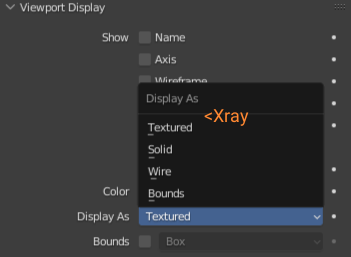
At the moment it is possible to set Xray globally - for everything, which looks quite messy during editing complex scenes, or for nothing. It could be useful to have the ability to set Xray display shading for individual elements
5 Comments
Good idea. To this, I'd add Wireframe view as an option. I'm one (of many) people who solid model over top of background wireframes as reference).
By changing the alpha value of the viewport displa in object or materials have exactly the same result.
It is a bit hidden, so this could be improved, bug more flexible as proposed here. Any ideas with this knowledge to make this easier?
Challenge of X-ray without a slider is that it might not work for all scenes as expected.
Current solutions has several trade-offs - Material's color alpha is problematic when object has multiple materials, so it disallow to handle opacity per object, while Object's color alpha allow to handle objects but disallow to see materials distribution in the viewport and cannot be applied simultaneously to several selected objects (like with alt+Click mechanics which allow to apply, for example, wireframe display to selected objects).
Maybe Xray opacity slider can be independent from Xray mode, to provide the ability to control opacity of all objects that are Xrayed individually.
I also wanted an Xray mode per object, thanks for providing a solution, didn't know about it. But I think a better way of using it like the one shown in the post should be available.
if the meshes are overlapping in the view the viewport overlays such as the selected parts of the behind mesh are no longer visible through the front mesh as such this is not a viable solution to the issue at hand imgur.com/a/8vlsWqM (how the solution proposed is vs how it should be) as it stands a per object xray toggle is desperately needed in blender in my humble opinion