
Animation Tracks & Controllers & Layers [3DSMAX like]
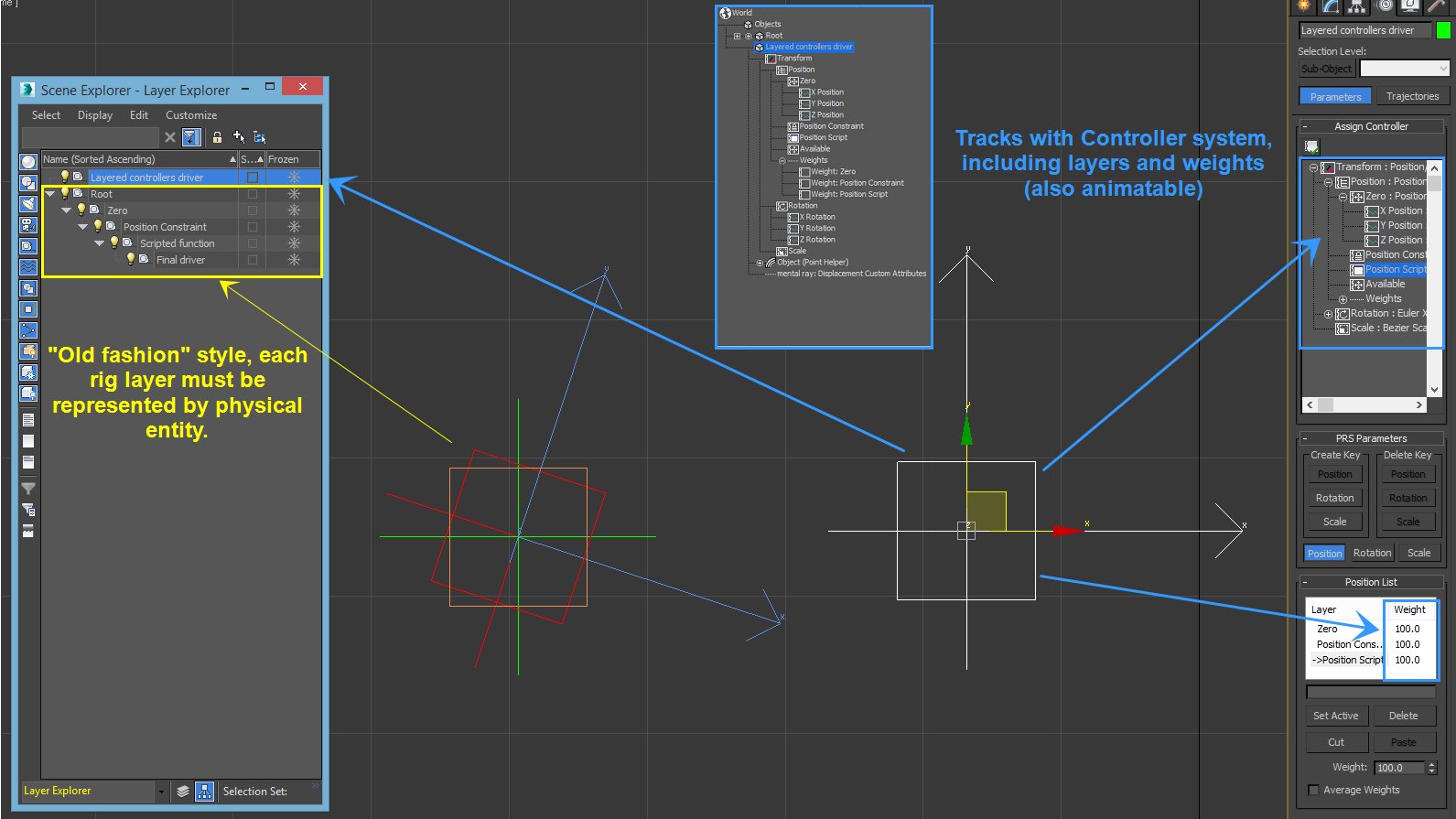
Yo Blender community! I wonder if there is anybody else, who is missing object track controllers as in 3DS MAX exists? I've met "modifiers" in Blender, but that is completely weak replacement. I wonder if there would be any will and effort to move this part of Blender to 21st century. As a rigger in MAX, I can't be satisfied with Maya style old fashion approach where every layer must be "physical". I would like to encourage Blender community to kick ATD in this filed as well with adding few more improvements above the MAX tech. For example with extension to group this controllers/layers to containers. With such approach rig and animations could become completely independent and linked to the scene. Also one scene element can have multiple rig functions which could by weighted by need of animator, etc. Riggers can create much cleaner rigs without complicated node structures with ease. So far, I'm struggling who to contact from the core to have a chat about this at least. I'm attaching MAX screen for those who are not familiar with such system. Any ideas or help on this, please?
5 Comments
He's talking about animation controllers. They all are organized in a layer system similar to the modify layers in blender. The result of these layered controllers determines the final position, rotation and scale.
Animation controllers are composed of one or more layers. Each layer has its own state machine and at any one point in time, the unit is in a particular state in each layer.
Animations in higher layers (later in the list) override animations in lower levels based on their blend masks. For example, if the animation in the higher level has a blend mask that includes the arms, it overrides the arm animations in the base layer.
Each Animation Controller can be used in various ways. The simplest would be to hold an animation but they could also be used for driver purposes, hold scripts for automation or simply to zero out positions.
It's great and well thought through system, but i doubt that is compatible with the existing animation system blender provides.
You're going to have to be a lot more clear and specific about what this feature is and what it does and where it would appear in Blender's interface.
Right now, you've given a name to a feature in another application, but you haven't described its functionality nor have you explained how you envision a user taking advantage of the feature in Blender.
* @Jason van Gumster * Sorry for that, I was expecting that anyone who would reply have any experience with this topic and software. I'll edit the post/topic.
* @zbynek * yup, ditto on that, I'm not sure what you are talking about; googled object track controller, no result (haven't used max since the 90s) In general, it's best to describe a feature on its own merits, than reference another app.
* @zbynek * I see that you've updated with a screenshot from 3DS Max, but that really doesn't help much. You need to describe the feature in full and suggest how you would recommend integrating it into Blender.