
Adjustable width Scrollbar for Wacom users
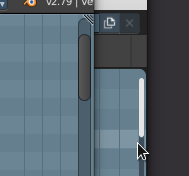
Most Wacom users are not able to turn the mouse wheel. This feature is not available on many popular Wacom products. Such users need a convenient Scrollbar. Up to 2.8 ScrollBar was convenient. In 2.8 it was made narrow. It's hard to get into it. Work with ScrollBar starts in large projects when the Outliner is big. Big project, a lot of hard work, and the need to poke into a thin ScrollBar is very distracting, disrupts the working rhythm.
Please adjust the width of the Scrollbar. And in general, don't forget about us, Wacom users.
8 Comments
yes please this!
usually I enable the emulation of the middle button and use alt + drag with my wacom
Why not just use the lower button on the pen. (The one you use to orbit in the viewport) Just click and drag the whole menu... No need for scrollbars at all. Having said that, I'm also not against having a theme setting for the width.
* @michael * When the tree of objects in the Outliner is small - yes, it is convenient to press the button on the stylus and flip through it. I agree.
Now imagine a project with 100, 150, 300 scenes. Only scenes... And there are also layers of visibility, and objects... For quick navigation in such projects you need ScrollBar. For me, such projects are commonplace. The product line, 30 similar products, from different angles, etc., and here are more than 150 scenes in the file. You can't say, "You don't need ScrollBar at all" if you're not the only one who needs it. For example, it is very difficult for me without it.
* @4dezigner * Well,... you might be better off using the search tool then. And no worries, I wasn't against adjustable width. ;)
* @michael * why the search if you can just pull the scrollbar strip? ))
You can set in the Wacom Tablet Settings, one of the tablet buttons to activate the scroll, but it just works awful.
I also would love to have this problem solved.
* @sauna.monster * I guess I didn't get my idea through the translator. Some very popular models do not have buttons on the tablet. There are buttons on the stylus. Yes, one of them works as a click on a wheel. This does not solve the issue of scrolling Outliner instantly.