
Viewport rendering GPU selection
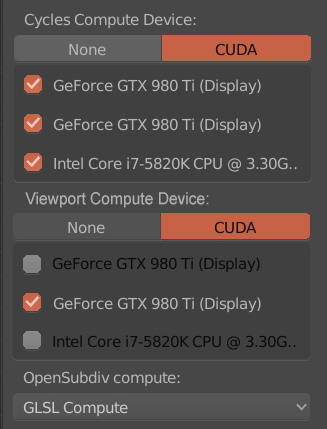
Correct me If I am wrong. Viewport rendering doesn't use 100% of extra cards. It seems everything else other than Blender uses the primary card too until it needs to use the second one or the software has the options to choose which one does what. As the primary card gets busy with other running applications it becomes slower so being able to decide any device other than the primary GPU for viewport rendering would be very wise.
Edit:
As discussed below (mostly my findings), maybe the real problem is that Blender isn't able to fully make use of the extra GPUs so when the primary gets a little busy the performance will drop a lot as the secondary ain't used efficiently.
11 Comments
Hi. I've created an addon which adresses exactly this issue (by allowing to choose different devices for viewport and final rendering). It's free. Check it out: youtu.be/rIddu96tDYE Download links: github.com/NOctis92/Viewport-Monogamy gumroad.com/l/Ocwql
maybe there will be a buttong for the rtx activation for cycles and eevee there ?
@dodododorian: ??????
@luisburdallo: just saying this menuis a good place to a potential nvidia rtx activation checkbox
@dodododorian: I know but I was confused as it doesn't have anything to do with the proposal matter and who knows when RTX will be supported.
@dodododorian: One must also wonder in which case it ever should be turned off then. :) Rhetorical question.
Just checked again and this time the first card was at 95% while the second fluctuates between 30-50%. It doesn't seem to be stable neither fully loaded. Then I switched to the first only and it could reach 100% while the second was at 0%. I switched again to the second only and it was reading 92%-100% fluctuating a bit but I could see my primary card using 20-25% due to the other tasks in the background I guess. It could be that the secondary card while viewport rendering is not fully optimized. But we need more tests. I think there is some room for improvement in this department.
It would be nice to have one card dedicated to viewport rendering and another dedicated to full renders. One reason is that I frequently forget to switch the view mode before rendering, so the render takes forever and the interface becomes very laggy. It would also be nice because other apps and the desktop would be more snappy while rendering.
@dpdpforlife: Are you sure viewport rendering isn't paused when doing a full render? I just checked and my interface doesn't become laggy. Also, I think everytime you switch views the render is canceled and it starts again when you switch back. If it was rendering while in other views it would continue from where you left off.
To my knowledge the viewport-render (shift+z) does use multiple cards. Everything you activated in the settings.
Eevee (realtime engine) just doesnt use multiple GPUs. devtalk.blender.org/t/is-will-eevee-support-multi-gpu/625 It will just use your "display" card for now.
@rbx775: I just checked with GPU-Z and you are right it uses both GPUs but something I found odd is that it doesn't use the second GPU full potential.