
Origin to Selected in Edit mode
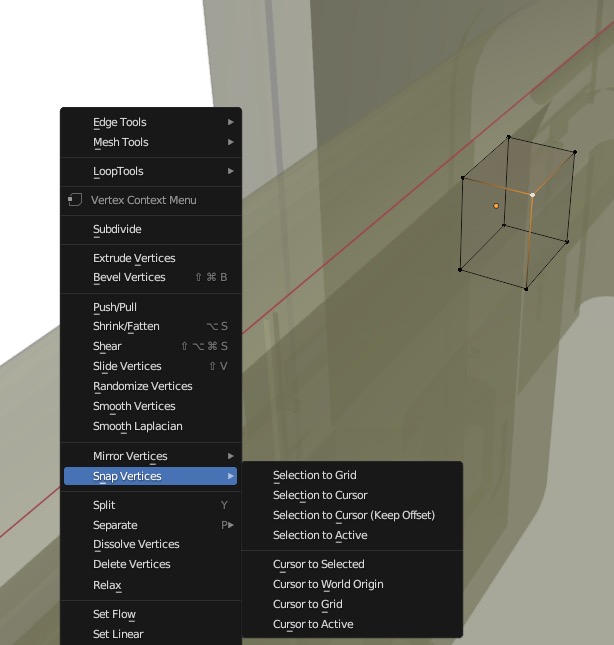
Issue: there is no direct option to set the origin in Edit mode to a vertex/edge/face. Two step work around: Set cursor to selected>Go to Object Mode>Set origin to 3D cursor Suggested function: Add "Origin to Selected" in Snap Vertices contextual menu.
I know there is a free script that enables a short cut. But in my opinion, this is a long overdue (and simple) missing functionality.
I see there is a duplicate post of 4 years ago and it surprises me that it didn't got much traction. Seems like an essential that many would be benefitting of.
6 Comments
I agree! There is a cool add-on that I use to fulfill that need, it is called 'Origine'. Idk if this is the add-on u referred to in the post.
There is a pie menu for that . It comes with Blender, just needs to be enabled.
The origin should simply be able to be snapped, using the snap option in the main view toolbar; menu options shouldn't even be necessary. I'm not even sure why a "Snap Vertices" menu needs to exist at all.
I believe this is being worked on for 4.0, though.
ctrl + .puts you into origin editing mode. Moving will only move the origin and you can snap it to things.I was imagine "snap to face center" when I typed it, but it wasn't a good generic response on my part.
That's slower to the proposal of the post. Yes you can move the origin and Snap it. But that takes more clicks than only pressing the face ==> Shift+x ==> Origin to face