
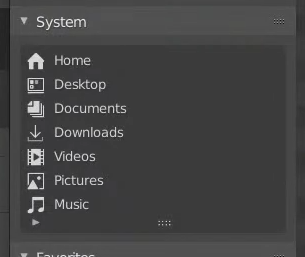
Let the user choose its System folders.
I though about this when watching the new System folders on
Blender Today live
.
I always have had an issue with them because it's easy to have them not working. And now that it got a little UI work on it and that Pablo said in that live stream that "if you don't have them, they're not gonna show up", I miss them even more. Because that feature could be awesome.

The issue
• If you don't have those "system" folders on your operating system, then Blender doesn't show these entries. Which might make sense at first, but there's more.
• If your OS uses them but Blender can't find them for some reason, then you will have only a few of those system folders, if any.
• If you don't want to use your OS's media folders but still have some homemade ones, Blender can't use them either.
A reasonable to that might be to just use the favorites since they are basically the same thing. But: • Favorites don't have a beautiful eye-catching icons like System folders do have now • The System panel is always there anyway, cluttering the little file explorer's space for nothing
My solution
Just let the user tell Blender where to look for these System Folder:

There's already a "file paths" tab in the user preferences. Let's just add a "System Folders" panel in there with each possible system folder available, where the default value is empty.
• An empty value results in the current behavior : Blender tries to get the folders by himself.
• If a valid data path is set, then it should be used as the corresponding system path.
That way, we fix the cases where Blender can't find them or when a user wants to customize them. So everyone is happy and I can have my system folders located on my secondary drive without losing Blender on the way.
8 Comments
1: There is already a list of custom bookmarks where you can add whatever you like.
2: Currently, the System panel simply replicates what you see in the Finder. To change what you see here, just add or remove items in the Finder sidebar
Emmm.. first time I see someone who use all this Windows default folders Downloads, Video, Picture,Music, etc. junk folders. Who ever used those useless folders? I alvays disable showing those folders in Explorer to not disturb me to navigate.
The only one I want to have in Blender is Desctop, because I often store some junk files in desctop folders.
But this suggestion already have 13 votes at this moment when some really important suggestions cant get even 6 - 7. I don't understand you humans....
Sorry for stealing votes from other more important topics.
* @-L0Lock- * :) No need to sorry, there is no any stealing.
I just really never used those folders as something handy to store data. For any data I need to store I always use drive D, or any rather than C with OS. OS can be broken and best way to do clean reinstall is formating drive C. My drive C only for OS, soflware, temp files and some random stuff on desctop. Something like this ... I dont understand people who use those folders for anything.
* @IIIFGIII * We work pretty much the same way then.
I use my L drive (L as in Library 😁). And I set windows to use my L drive folders as media folders, so it works perfectly fine and pretty much any software supporting Windows media folders can use them with no issue... Except Blender who seem to not detect them at all, except the desktop for some reason.
That's part of why I made this proposal. For those who have media folders set in a way Blender can't understand, and those who just want to use them in another way. I guess if I didn't used media folders at all, I would still have a folder with textures and I'd like to set it as Blender's Pictures folders, and so on...
In the later case it's barely like using favorites, but with the advantage of shiny icons.
I personally also use all the folder (but not document as every program like to add bunch of folders here) Also i would lmike to anwser in this old thread (if by change any dev working on that see my comment) that the 3D Objects (added in new version of windows 10 at same time as paint 3D) could be added to the System default folders too. I use it often for my 3D prints.
With Windows everything just follows if its just being pointed to that quick access Downloads folder, and I don't really know whats the filepath what makes it work like that?
From filepath it seems to open if I just type "Downloads"