
Possible DoF improvements? (second try)
Hi everyone, during my usual study regarding rendering, post-production and so on I stumbled upon this tutorial:
(unfortunately is in Spanish but I can't find an equivalent English alternative)
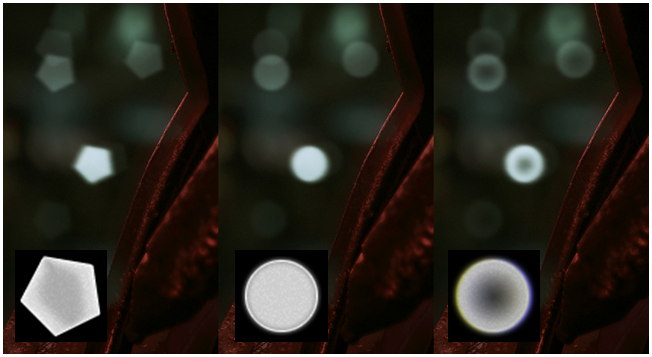
So, I started to search if there is any way to achieve a similar result described in this tutorial directly using the DoF option that Cycles offer. Obviously, I know that I can control the number of blades that affect the final shape of the bokeh and that I can modify the ratio to simulate anamorphic lenses. What is not possible, or at least what I think at the moment is not possible is to change the brightness between the border and the center of the iris (minute 20 of the tutorial). Another cool feature that this addon of After Effect has is the possibility to upload an image to control the aspect of the bokeh (minute 22 of the tutorial).
I think it would be great to have these options that would increase exponentially the realism of this amazing render engine. What do you think?
5 Comments
Here's another example. This is from Indigo, same principle. Indeed, it would be really something to have this feature in Cycles vimeo.com/216523915
I believe this is a good read, to see what's possible with raytraced bokeh effects: rmanwiki.pixar.com/display/REN/Bokeh
There are 5 basic features, three of which are already in cycles (blades, rotation, anamorphic ratio)
The two missing are: Roundness: controls how rounded or pointy the polygonal shapes are. Density:controls the distribution of the light towards the center or edge of the bokeh.
One more I would like to see is anamorphic rotation.
There is a node in the compositor for creating bokeh blur textures and it's just like the image you're showing, IIRC.
* @Josephbburg * Guido-Medici is not talking about the bokeh in the compositing but the one in-camera. Most modern render engines allow the user to tweak the bokeh to some degree. In Redshift you can use your own bokeh image to add different shapes or increase chromatic aberration and also control the diffraction (the one Guido-Medici is talking about). Despite there are techniques in Blender in order to achieve something similar they are not straight out of the box and may also increase render times. I like Cycles bokeh but I agree, some additional options would be really welcome. A while back I stumbled upon a page with beautiful examples of bokeh results, can't remember if it was for Nuke or Arnold, but sure it was looking great. If I find it I'll post it here.
* @verysame * Currently the best you can do, is to render through a modeled pinhole, So create a hole in plane and render through it. But I've also had that hope that we had a pinhole editor in Blender so that we would not need to model it, but instead use the editor where the parameters are correct.
What would I expect it to do:
You click "edit pinhole" in camera settings and then you will be exported the selected pinhole preset in isolated 3d-view where you can edit it. After your edits you press "save preset" or "save new" or something like that and then you have edited the current pinhole preset or created new preset which you could use in rendering. I think this could be done as an addon very easily.