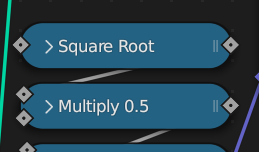
See secondary values in nodes when they are collapsed
Basically the image down below :)
88.9%
Development Status:
Open
Upvote8Downvote1
c
costa
29 Jan 2023
5 Comments
m
mrajendra2150
Actually better if there is an option to simply click and drag that option to create it a seperate value node.
j
jeroenbakker
How will this work when a label was set for the node. Will the label override this behaviour?
There are many cases when you want to see this. In code we might need to go over each case. I can imagine some nodes can be categorised to reduce code.
This could be done as contributor patches when the idea has been fleshed out.
p
phillip
I'm currently using labels to achieve this effect. I had in mind to suggest that when adding a label it bring in the original (add, multiply, etc.) so I could just add the ".5" or "-1". Instead, I rename things like "half", "double", or "*inverse" (for multiplicative inverse). With this suggestion, showing "Multiply -1.000" would fit my needs.
If adding a label, it would override this other default label as it currently does. I would still consider carrying over the default to a new label. Having it already highlighted would allow easy replacement, but you could keep and add as well.
m
mrajendra2150
basically you want whatever default values we change should be appeared after hiding it there should an option like Shift-click on the node point to pin it.
c
costaAuthor
Yeah sure, making it optional would be even better :)

5 Comments
Actually better if there is an option to simply click and drag that option to create it a seperate value node.
How will this work when a label was set for the node. Will the label override this behaviour?
There are many cases when you want to see this. In code we might need to go over each case. I can imagine some nodes can be categorised to reduce code.
This could be done as contributor patches when the idea has been fleshed out.
I'm currently using labels to achieve this effect. I had in mind to suggest that when adding a label it bring in the original (add, multiply, etc.) so I could just add the ".5" or "-1". Instead, I rename things like "half", "double", or "*inverse" (for multiplicative inverse). With this suggestion, showing "Multiply -1.000" would fit my needs.
If adding a label, it would override this other default label as it currently does. I would still consider carrying over the default to a new label. Having it already highlighted would allow easy replacement, but you could keep and add as well.
basically you want whatever default values we change should be appeared after hiding it there should an option like Shift-click on the node point to pin it.
Yeah sure, making it optional would be even better :)