
Quick drag nodes onto editor
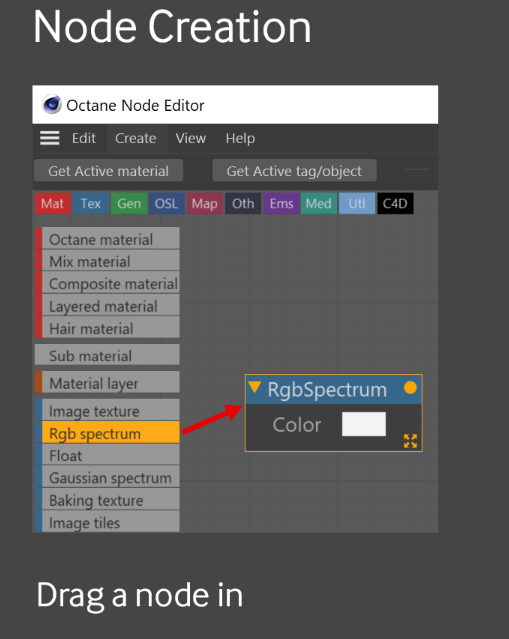
I recently found that C4D Octane shader editor has a list of nodes on the left that you can just drag onto the editor window.
I think blender could have an easier way to add nodes, specially the popular ones such as color ramp, noise, mix shader, etc. You could have them all listed on the side, or custom select the ones you use more often.
I know you can bring them up through shortcuts, but they are hard to remember. I usually do Shift-A, then manually click on the search bar and type the node I need.
It's also easier to have a broader view of all nodes at once and decide which ones you need to use. I often forget about certain nodes exist. This could also help beginners.
I also imagine, one could quickly drag in many nodes to block out a node tree, faster than currently possible.
Maybe you could open the nodes like you open/close the N-panel.
This would also apply to geometry nodes.
4 Comments
Actually, this could be a nice addon. Not a super tough thing to make
That sounds reasonable. And particularly handfull for tablet users.
Blender used to expose nodes as buttons in the left sidebar untill 2.79:
I could easily imagine nodes being in the current active tool bar.
i'm not a tablet user and i would find this super useful. why did they remove it?
I think because the goal was to unify the new active tool shelves they were implementing back then, having many tabs and buttons looked cluttered, and they wanted to push the usage of the Add menu and searchbar.