
Viewport/Render and Eevee/Cycles switch node.
For optimal performance in viewport in heavy scenes, there is not enough node that switches, for example, the number of particles for viewport (less) and for rendering (more).
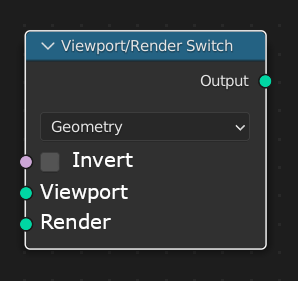 For example, for viewport you plug in a value of 100, and for the renderer 1000.
Also, a similar node would be useful in the shader editor.
But in the shader editor you can add no less interesting node, switching between renderers Eevee and Cycles.
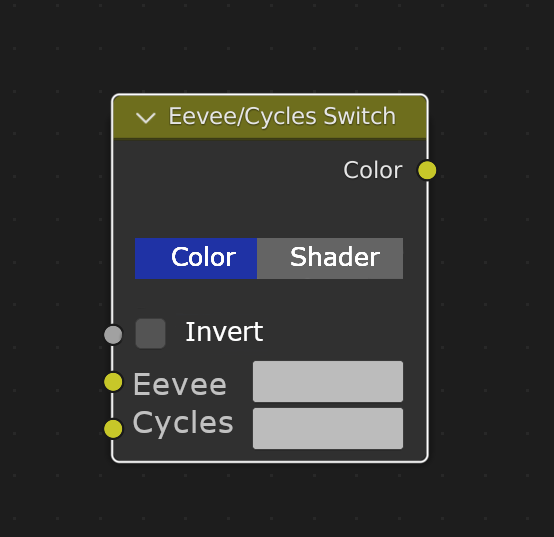 This would be useful when some functionality doesn't work in eevee and you have to look for other solutions. Or another example, Cycles and Eevee have a very different roughness map, and a switch like this would be useful.
The main difference from a simple switch node is the automation of the process
And the invert button will add the ability to quickly see how the set value appears in the renderer.
4 Comments
The render switch node is easy made with (Is Viewport) node now. docs.blender.org/manual/en/2.93/modeling/geometry_nodes/input/is_viewport.html
[Is Viewport] ------ [(Switch - "Integer" - False: 3 - True: 1) Output] ------ [Subdivide LVL]
Eevee Cycles switch node. Eevee Cycles switch node. Eevee Cycles switch node. like this
You can actually do this now, material output has a dropdown for choosing which render engine you would like to output to. The material output node has a dropdown for choosing which render engine to output the material to, you can choose between All, Eevee and Cycles. You can also have more than one material output node. So for example you could have two material output nodes, one for Eevee, one for Cycles, and output different materials to both. I've done this myself with many of my materials, for example I have glass materials I reuse with a hacky fake glass shader node group going to the Eevee output and the regular Glass BDSF going to the Cycles output.
"Is X render engine" node Would be sufficient for all cases, no need to make custom switches/lerps/etc.