
QoL Feature Request: Sorting and Batch Renaming Action Slots
I don't think I'm alone in thinking that the Action Slot UI could use a little more TLC. It's a little clumsy to use if you have a lot of animation slots that you need to edit and rename for different use cases. Of course, these requests could extend to the Action Clip UI as well, but I find that you'll find yourself with more Slots than overall Actions. I feel there are a couple features that could make navigating that little bar a little smoother. I understand a custom script could potentially be made for these, but I feel the stock Blender experience with these could be improved.
- Extend the length of the text bar.
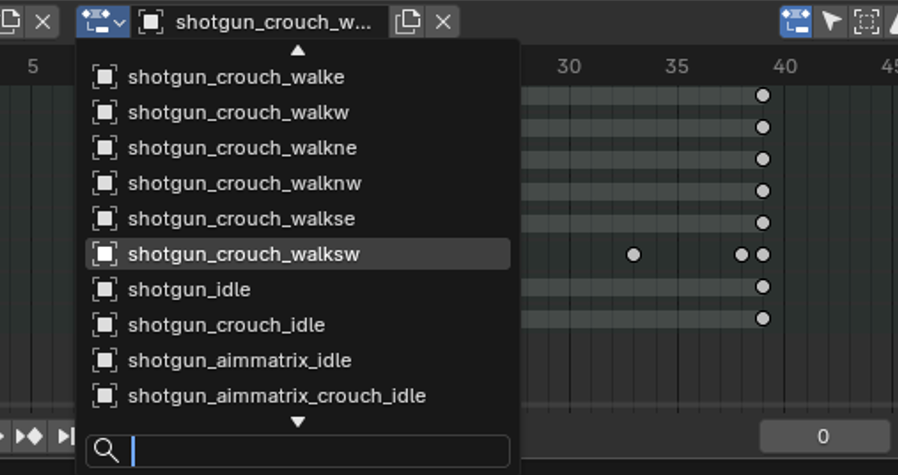
If you have any name that's longer than like 7 characters, it'll get cut off. Even though the bar DOES extend with the length of the text with plenty of empty space to the right, it will always be too short and cut off the end of the slot name.
- Add the ability to sort action slots per action.
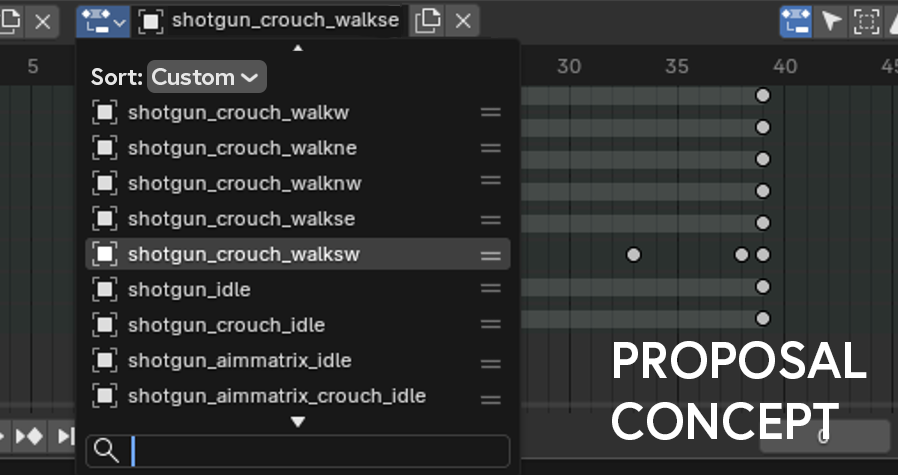
[EDIT] Just found you can re-order slots through the action editor, and it'll show that order in the dropdown menu. So this one's a bit of a moot point, but I still think being able to reorder from the dropdown would be a very pleasant QoL feature. It would allow you to reorder slots while still only showing the slot of the active object.
[Original Point] Once you start adding multiple slots to an action, you'll be permanently stuck with the chronological order that you added each slot. The only way to change this order is to either copy and paste the animation data between slots and rename them, or start a brand new action clip and start adding in the slots in your desired order from the beginning. There's a search feature which is great, but it's still stuck in that original chronological order.
I request a way to sort these action slots per action. You could do an overall sort by creation date (default) or alphabetically, or allow us to drag and move action slots manually (preferably allowing multiple at a time, much like the action editor and its vertical bone order).
In the concept image above I show little semi-hamburger icons to signify moveability, perhaps you could have the option to click and drag the burger on a single slot, or click once to select the slot and either shift or ctrl click another slot, then click and drag to move all of them with one of the selected hamburger icons. With the burger icons being a separate selectable element, that still allows you to click once on the text to engage that animation data like you normally would.
- Add the ability to batch rename slots.
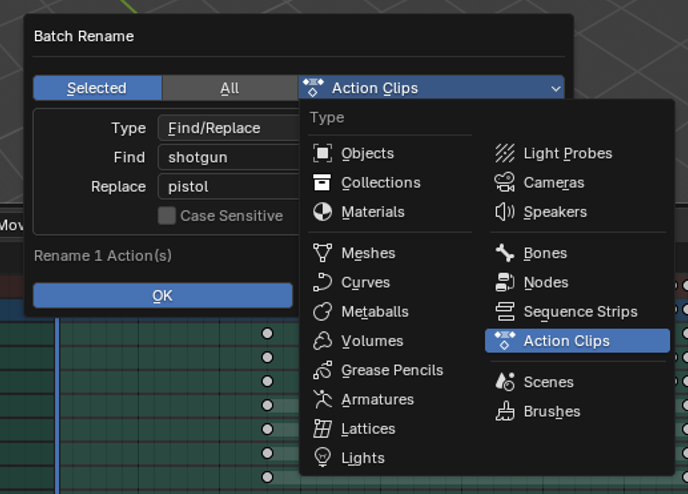
You can already do this exact thing with Action Clips, and it works exactly how it should work with Action Slots. My request is to include the option for slots just below the option for clips. This alone would save a lot of time, and is arguably the feature I'd like to see the most.
That's about it. I may be naive but I don't believe these should be too much of a pain to implement. Myself and I'm sure many others would be very appreciative of these features. Thank you for taking the time to read this request.
0 Comments