
RGB Curves: add proportional editing ability or copy paste
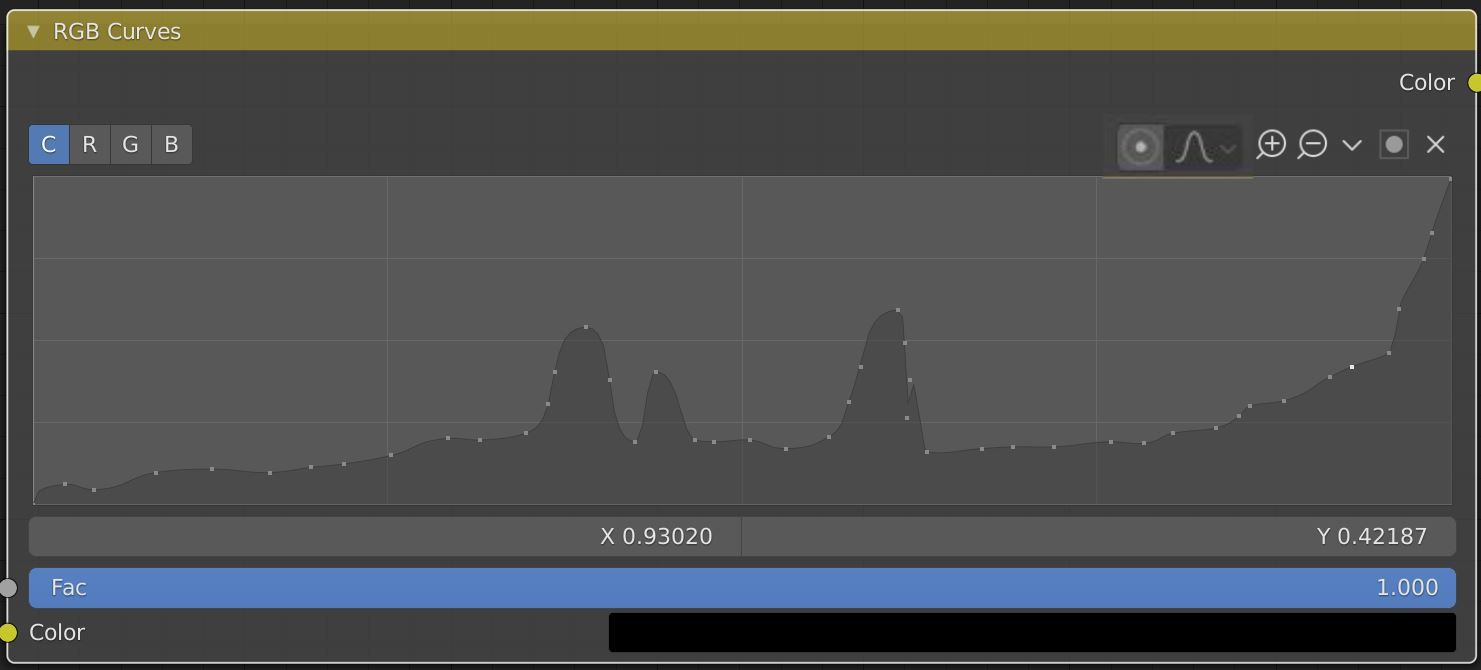
The picture above shows a mockup of the rgb curves node with the proportional editing icons included.
It would be nice to edit multiple points on a rgb curve at once without shift clicking them. perhaps this could be another mode you could enter if you press "o" shortcut to proportional edit curve. I am open to other ideas perhaps pressing o gives a whole range of tools like copy paste. ctrl c ctrl v shortcut certain point parts of curve to another rgb curve node to use further.
Copy could be a 1 to 1 match where you select 2 out of 3 points then only 2 would be copied.
Alternatively copying could work by first selecting a single point and ctrl c copies everything to right of that selected single point.
Other selection tools like select box /select lasso could be useful.
Obviously if its more tools than just proportional editing get added it may need a button to press or shortcut to enter a more user friendly mode. Bezier curves/ handles could also be helpful addition to tweak the RGB curves node as it is common in other areas of blender.
3 Comments
and bezier curves!
On Resolve click is ordinary point, and long press makes bezier, which again turns back to point from click
handles for bezier curves on the rgb curves node would be nice as well yes I will add that at the bottom
blender.community/c/rightclickselect/20hbbc Operate by profile can be ok.