
Cycles: Add Separate Render Passes for Coat, Sheen, SSS and Metallic — Fix Premult Inconsistency
Context I'm a freelance 3D artist currently working with Chromatica Film Srl, an Italian production studio. We use Blender/Cycles as our primary DCC and deliver renders to compositors who work in Nuke. This request reflects real production pain points that come up on every project.
1. Missing dedicated render passes for Principled BSDF layers
Since Blender 4.0, the Principled BSDF exposes Coat, Sheen, and SSS as distinct material layers — but Cycles still does not provide dedicated render passes for them. All of these components are silently merged into the existing Glossy or Diffuse passes, making it impossible to isolate them in compositing without additional render passes or costly workarounds.
The following passes are missing and are routinely requested by our compositors:
- Coat Direct / Coat Indirect / Coat Color
- Sheen Direct / Sheen Indirect / Sheen Color
- SSS Direct / SSS Indirect / SSS Color (currently merged into Diffuse — needs to be a separate group)
- Metallic Direct / Metallic Indirect (currently merged into Glossy)
Production compositors need these passes to independently grade, denoise, and relight material layers — which is standard practice in VFX pipelines (Arnold, Karma, V-Ray all provide this level of granularity natively).
2. Inconsistent premultiplication across light passes
The Glossy Direct/Indirect and Diffuse Direct/Indirect passes are delivered unpremultiplied (light-only, without the color/albedo baked in), while other passes behave differently. This forces compositors to manually premultiply them via a Math node in the Blender compositor before they can be used. The premultiplication behavior should be consistent and clearly documented across all light passes, ideally matching the convention used by other production renderers.
3. Pass reconstruction does not match the Beauty (Combined) pass
When reconstructing the final image in Nuke by combining all individual light passes (Diffuse Direct × Diffuse Color + Diffuse Indirect × Diffuse Color + Glossy Direct × Glossy Color + … + Emission + Environment), the result does not match the Beauty (Combined) pass 1:1.
The discrepancy appears to be related to denoising: the Beauty pass is denoised as a single unified image, while individual passes are denoised separately. When the denoised passes are recombined, the result is visibly different — typically less smooth — compared to the directly denoised Combined output.
This makes pass-based compositing workflows unreliable. A production pipeline depends on the mathematical identity:
Beauty ≈ Σ (Pass_Direct × Pass_Color) + Σ Pass_Indirect × Pass_Color + Emission + Environment
If this identity does not hold after denoising, compositors cannot trust the individual passes and are forced to use only the Combined output, losing all the flexibility that render passes are supposed to provide.
Proposed fix: Either ensure that denoising applied to the Combined pass is also consistently applied per-pass (so reconstruction holds), or clearly expose a "pre-denoise Combined" output alongside the denoised one for reference.
Summary of requests
- Add dedicated Coat, Sheen, SSS, and Metallic render passes (Direct/Indirect/Color) to Cycles
- Standardize premultiplication behavior across all light passes
- Fix pass reconstruction so that recombining individual passes in a compositing application produces a result that matches the Beauty pass
These are not edge cases — they are standard requirements for any studio-level compositing pipeline. Addressing them would significantly improve Blender's viability in professional VFX production.
8 Comments
Adding coat/sheen and metallic passes is a nice idea. And it would be even nicer if they resolve the bug where some pixels on metallic objects turn black with strange artifacts around them when doing back to beauty 😄 (But I think that gets fixed in the next version). Maybe, also shadow masks would be nice for some things.
but I dont quite get the second point...
Isn't this just the way Blender handles passes. Arnold/Maya offers a list with passes where you can choose between e.g. "specular" or ("specular indir" + "specular dir") * "specualr albedo" while Blender offers this not directly in a single menu but offers that flexibility to combine and export the passes as needed in the compositor.
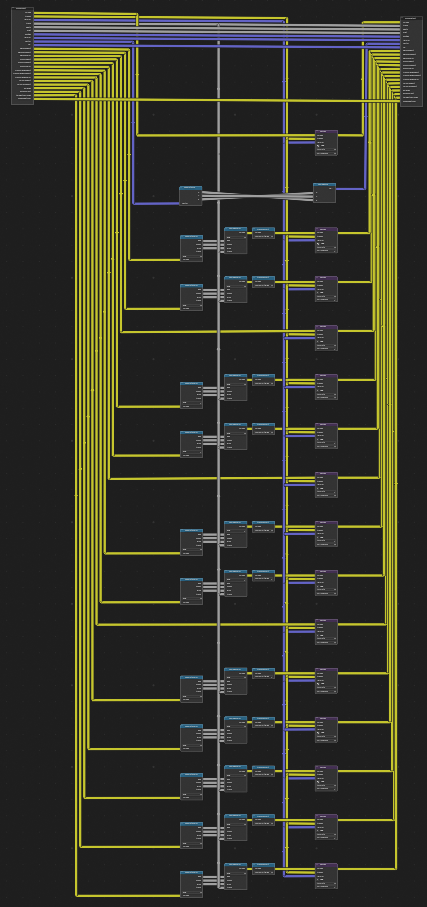
I Personally think the problem is rather that Blender does not offer a fast way by default to connect the "render layers" node to the file output node. You either have to create presets and store them as asset, rebuild the comp/export setup all the time , or use addons... There should be a faster way to combine and export passes like needed while still doing that in the compositor.
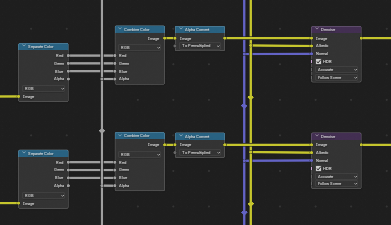
Thanks for the detailed feedback! Let me clarify point 2 better - the issue is not exactly about the light data itself, but about the alpha channel. The Diffuse Direct/Indirect and Glossy Direct/Indirect passes have a different alpha compared to the Beauty pass. This means that in Nuke, when I try to reconstruct the beauty and apply grades on individual passes, the comp breaks because the alphas don't match. By premultiplying those 4 passes in the Blender compositor I can realign their alpha with the Beauty and the reconstruction holds correctly. And yes, the metallic black pixel artifact is a real pain on back to beauty, glad to hear it might be fixed in the next version! Your point about the Render Layers → File Output connection is also spot on, that alone would save a lot of time on every project.
I think this is the fix, that should avoid the black artifacts on metallic objects in future projects.blender.org/blender/blender/pulls/158819
I actually never noticed in Nuke that some of the passes are not premultiplied. I will definitely have an eye on that the next time.
From a quick test it seems like the color passes are premultiplied while the direct and indirect passes are unpremultiplied. I am not totally sure but isn't this right since you are adding "dir" and "indir" and then multiplying it with the premultiplied color channel...
Even if you multiply e.g. diff_dir and diff_indir separately with the color, so you just export diff_dir and diff_indir with the color already multiplied, then they should be "premultiplied" since the color channel was premultiplied.
Maybe I forgot something 🤔
This is slightly unrelated but I had a question, what are the uses in the image above for the Seperate Color, Combine Color and Alpha Convert before going into the denoise node? Do they provide an additional benefit? (I also upvoted the post!)
Thanks for the upvote! Happy to explain... what you see is essentially a manual premultiplication fix. The Diffuse Direct/Indirect and Glossy Direct/Indirect passes come out with a different alpha compared to the Beauty pass. So what I do is: separate the RGB channels from the alpha of those passes, recombine them using the Beauty's alpha instead, and then run them through the Alpha Convert (To Premultiplied) node to realign them with the Beauty. Without this, when reconstructing the beauty in Nuke and applying grades on individual passes, the comp breaks because the alphas don't match. With this fix the reconstruction holds correctly and grading individual passes works as expected. It's a workaround for what I think should be handled consistently by Cycles itself, which is part of what this feature request is about 😊
Upvoted, this is definitely a good idea.
The last screenshot pains my eyes haha, just a quick tip : you can duplicate the
Render Layersnode and only use the outputs you want, and Ctrl+ H when you're done to have everything looking good and clean :)Thanks for the tip, it's really useful! Just to clarify though, what you see in the screenshot is actually a node group. The reason I prefer this approach is that sometimes people forget to include the setup at the start of a project, and having to redo everything from scratch is painful. We do set it up in the startup file, but sometimes someone resets Blender or something goes wrong and it gets lost. With a node group you can simply import it or copy it from another file and you're always covered 😊 Anyway, I checked your reel, you're awesome man!
Great idea, coming from an Arnold and Karma user