
Image Editor Scopes to have their own area Display Mode (like in VSE)
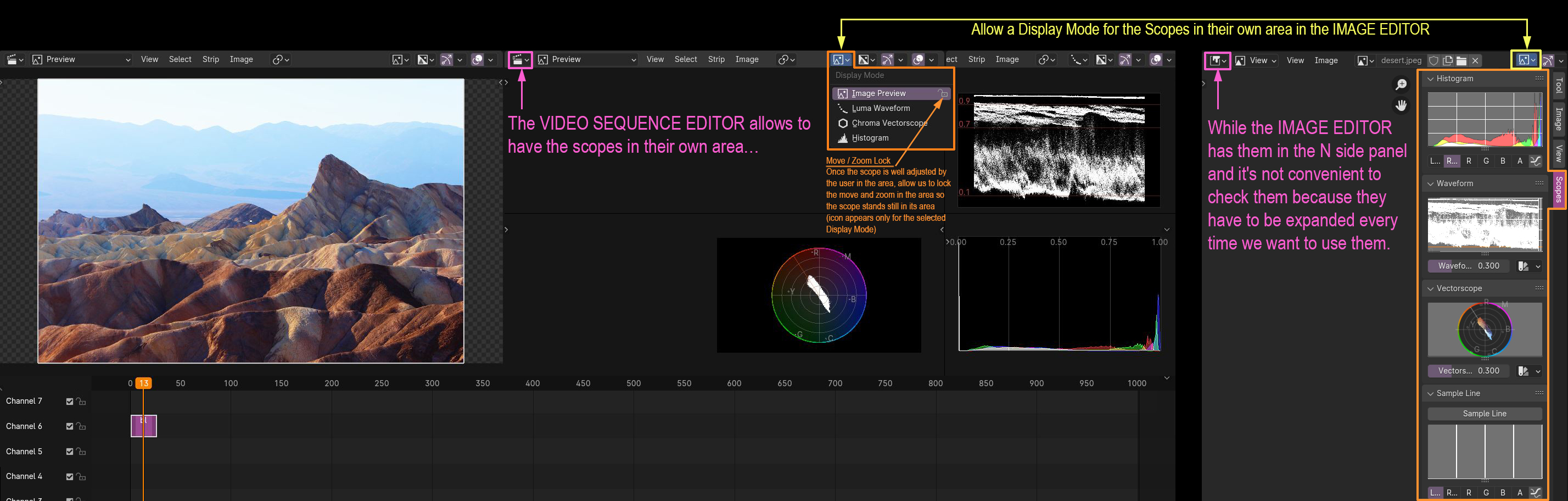
Currently, the scopes in the Image Editor are in their own tab in the N side panel. It is not very practical for the following reasons:
- Side panel hides a good portion of the image you want to review (if it's not full screen, which ususally isn't)
- Can't view all scopes at the same time (or they have to be small, thus useless)
- Have to rescale the scopes all the time to be bigger
- Have to make this set up every time, can't be integrated properly in a workpspace layout
The proposal is to make Scopes have a Display Mode (like in the Video Sequence Editor) where they can be arrangeable in their own area, so we would be able to rearrange the Compositing worskpace as a more similar layout to other softwares dedicated to color grading.
BONUS: It would be also nice if they had the option to lock the zooming and moving once they are placed neatly in the UI, so it prevents them from going out of view inadvertently while working.
0 Comments