
Cage transformation
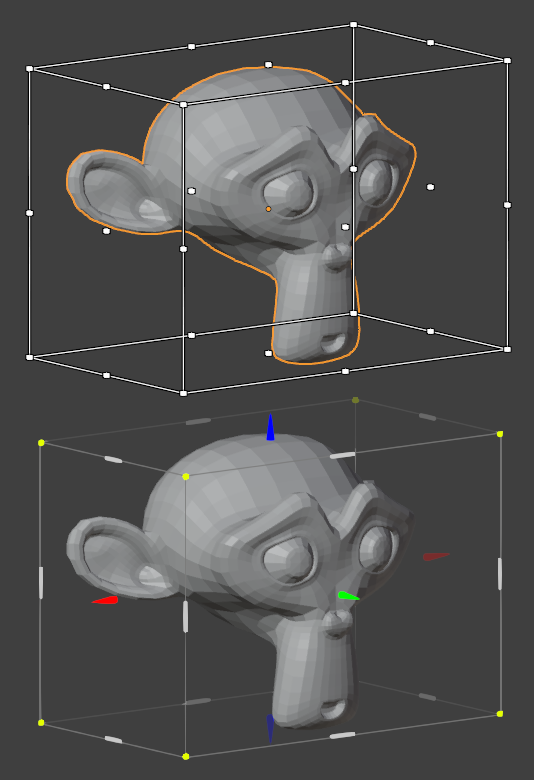
I never use Scale Cage, although it seems useful at first, and I think these are the reasons:
· It doesn't work with most snaps.
· From the side view, you cannot scale only on one axis, since the gizmo is hidden.
· Only scale, does not allow rotating from the edges of the box, or aligning or distributing objects.
· It doesn't allow shearing or deform the shape.
· Visually, there's no difference between the gizmos that scale one, two or three axes.
· The gizmos at the back and front are not differentiated.
· The tool does not have its own entity, it is hidden under the scaling tool.
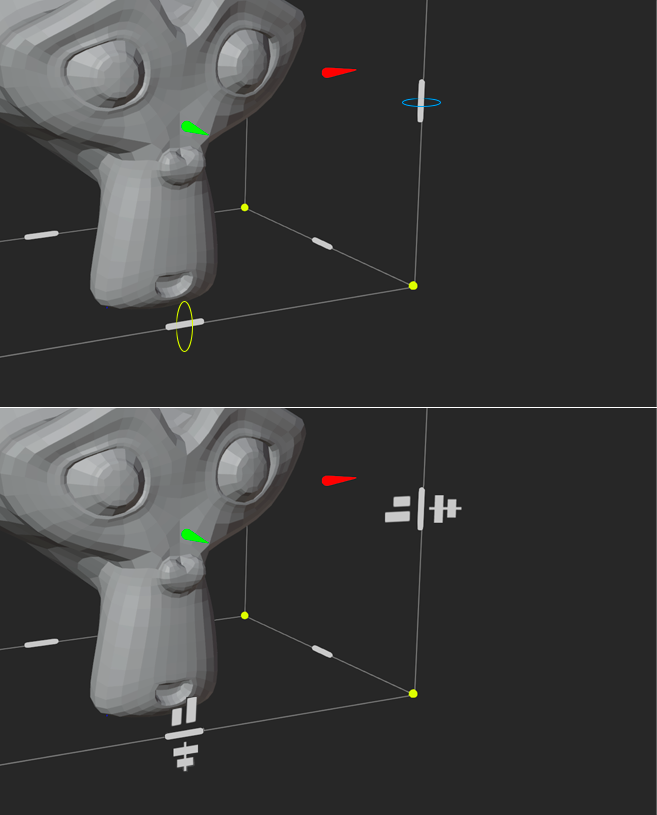
In the attached image, I try to better show the number of axes that affect the transformations, and I differentiate between the perimeter lines of the box, and the rotation bars to pivot from the side corners.
I also think it would be interesting to modify the functionality of the box (pressing Ctrl or activating a submode), and allow shearing or deform like a 2*2 Lattice, but in Object and Edit mode (I don't know how, but it would be great if it could act as a temporary unlimited lattice), and adding buttons for aligning and distributing objects or elements could pop up when approaching the center of the edges of the box.
In addition to being compatible with Blender's snap to vertex..., it could snap with the bounding boxes of unselected objects, like most vector programs.
2 Comments
While you are here you can check this related proposal too blender.community/c/rightclickselect/g2MG/
Good, I voted for it.
Anyway, I think that the gizmos I have proposed to rotate from them, can be used to directly enter distance values by clicking on them, or to align by clicking on their sides.
I added an image to the proposal.