
Highlight UV selection in 3D view
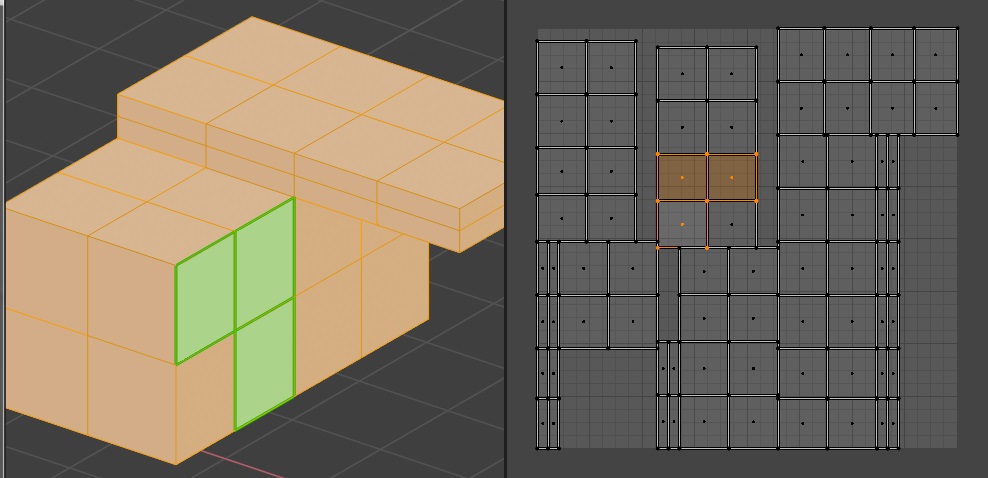
When unwrapping, sometimes I want to see where is my UV selction located in the 3D mesh.
I know there is the option "keep UV and edit mode mesh selection in sync" in the UV editor, but It comes with downsides like the inability to select islands and also, when selecting edges or vertices on seams, every instance of this vertex/edge will be selected and you are not able to move them seperately.

In my opinion working in this "keep UV and edit mode mesh selection in sync" mode is not possible. that means you allways have to switch this button on and off and also you must not forget to select everything before switching this mode when you want to have the whole UV mesh visible afterwards.
Why not, just highlight the UV selection in the 3D viewport without change the editmode selection. like you are already able to highlight Seams, Creases, and Sharps.
24 Comments
A must have for sure
I look at those two down-votes and just wonder about them... 🤔
they should rework the UV editor and how it does that, for example maya has just one mode and does all that with no problems and you don't have to keep clicking a button to sync...
* @Cobra * Yes, should be good enough to add additional mode to selection system in UV Editor like so (Vertex, Edge, Face, UV) UV would work like vertex mode when sync is off (it works in maya and no need to constantly switch on and off Sync mode)
also maybe the way around too ;Highlighting the seams borders in the UV editor :)
Absolutely must have.
Yess, this is super required
I'm coming over from Maya and I was surprised this isn't how it works already, thinking I must be doing something wrong. When I click on an item in the UV editor, having it ALSO highlight on the object is a key way of understanding how things get stitched together, or finding out "what is this random little UV over here?"
In low poly modeling for game-dev, where you need checking and control almost every point - very useful. Thank you to add in development!
UV syncing is worst solution ever in any 3D software I've used. Simply put it is bandaid, not a solution. In any decent 3D software you can simply see UV-selection in mesh. UV faces always mirror your geometry, so why not select the same components in both when doing UV-editing? Also, hiding/unhiding mesh or UV-faces and selecting shared edges or verts shouldn't ever be limited/hindered by some strange sync feature.
Zen Sets add-on ( blendermarket.com/products/zen-sets ) can show UV selections in 3D viewport, but it's not real-time.
I signed up here just to upvote this feature. It is quite frustrating that there's no highlight in the 3D window for the UV Editor selection when Sync is disabled. Has anyone found an add-on that does this?
Uv Highlight, but working weird in 3.0 for example showing the selection on the hided polygons too. blenderartists.org/t/addon-similar-to-uv-highlight-for-2-80/1169286
Nice topic! Thanks)
Yes Please!
I'd really like to have the orientation also highlighted in some way. Maybe an arrow in the 3d model which points toward +Y from the uv editor?
I like this suggested feature! Good!
Hi,Friends,we have previously developed a more comprehensive add-on: github.com/AIGODLIKE/uv_drawuv
The tagline on this says in development? Does that mean we can expect to see it soon? I ask because as it stands (coming from both max/maya) for low poly modelling/texturing the workflow is absolutely lacking. I really wanted to get into blender, but as it stands this one feature has completely stopped me wanting to go any further. Not being able to select a vertex/uv in the uv window and see it reflected on the model is a massive part of low poly uving and not having it here is a huge oversight. ATM you either enable sync mode which doesn't allow you to select a single uv without grabbing all the ones on the vertex it's connected to - OR - having to select all the verts on the model in the viewport and then not being able to see which uv you're editing (cos they are all selected - wtf!!! I can't believe this is a thing & I don't know how anyone can texture like this.....unless I have missed something fundamental (dont think so after reading this thread tho - also 5 year old thread btw
Mentioned in projects.blender.org/blender/blender/issues/78393
Totally agree this would be super helpful. Thanks to the devs for tackling it! For some more ideas on other UV improvements I made another request. Hope this isn't rude or taboo. can remove if so. blender.community/c/rightclickselect/D0Y5/
is there any update ?
+1 Go go, we need this badly ! :)
Agreed entirely. Selection highlight should sync in the 3D view at all times.