
Use Object Mesh as Curve geometry
UPDATE: This is has been partially achieved in the version 2.90, integrated in the Array Modifier as Fit Type: Fit Curve. Still need to be able to do it the other way around.
I may not have found a way to do it, but I think there is no way to use a 3D mesh as the geometry of a curve.
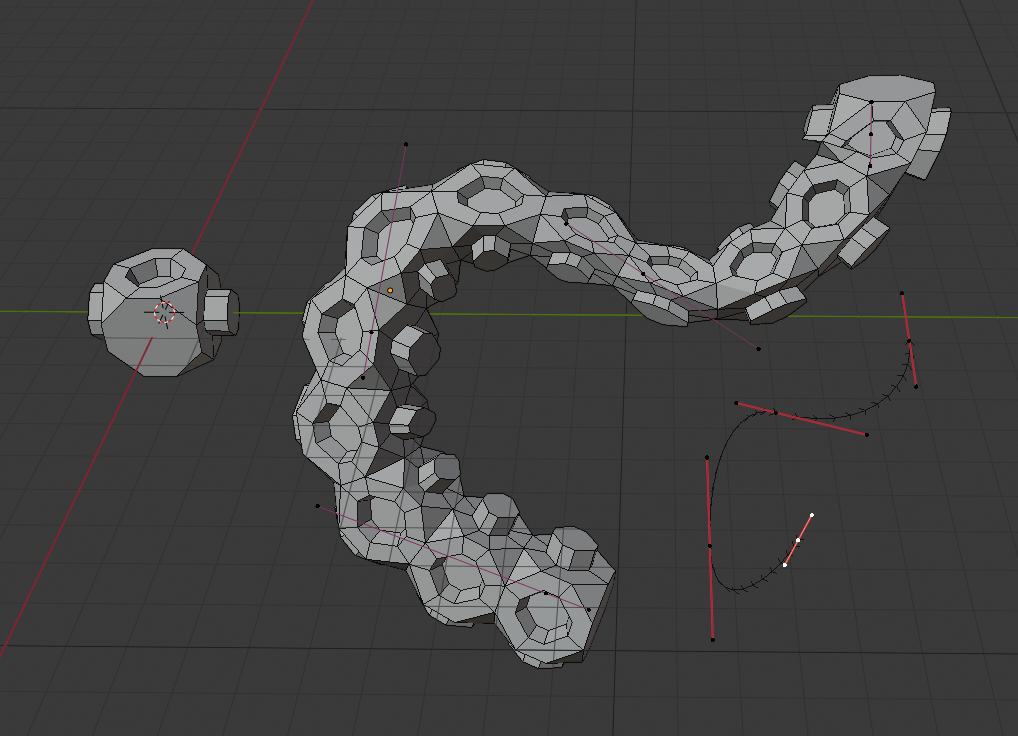
Currently, the 3D geometry option of the curve only allows you to use other curves as a geometry profile. Ideally, there should be an option to use another Mesh, which continuously duplicates along its entire length, including "merge" options between its edges. In this way, multiple curves could be created referencing the same object, and the mesh modification would affect the rendering of all curves, in the same way that particles instantiate 3D Meshes.
To obtain a similar result, you would have to apply a curve modifier to a Mesh, in addition to an array modifier. This method has several drawbacks:
- In order to make more curves with the same geometry, you would have to duplicate the object and create a new curve.
- Both the 3D mesh and the curve must share the same position, rotation and scale to have a correct alignment.
- Both elements (the curve and the 3D Mesh) must be present in the scene in order to modify its repetition, cadence, and shape.
- Generally, 3D Meshes end up eclipsing the curve, making them difficult to select unless you go to X-Ray or Wireframe mode.
- The curve modifier only works on the first of the curves in the object, not being able to create independent filaments within the same curve.
4 Comments
I'm happy to see that this has been achieved by adding the Fit Type: Fit Curve to the Array Modifier! Cheers for the amazing development team!
I agree. You can already do it Mesh > Modifier > Curve, but being able to do it the other way around would be nice too.
On the mesh add an array modifier, with the merge option active then add a curve modifier. and select the curve you want to use. That way you are using mesh geometry for the curve. So it is actually possible to use geo as a curve profile. It is just not a setting you have directly on the curve but by using modifiers on the mesh.
* @datadieb * Thanks for your comment, but, have you read the entire post? I actually explain all the drawbacks of what you just said... :P