
Image Output node (possibly easy baking solution)
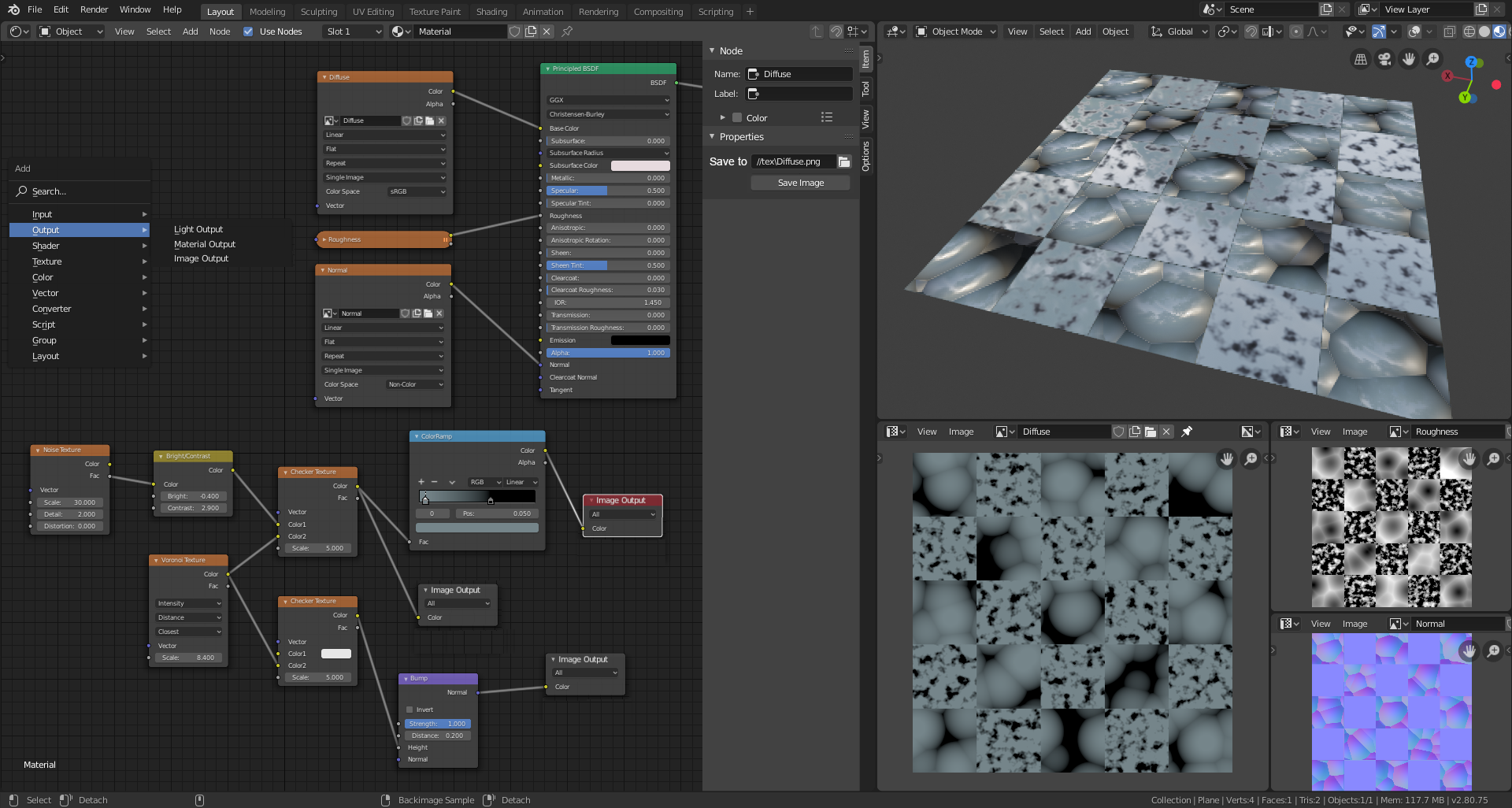
You know, I worked with Nuke, a node based compositing software, and worked with Houdini, and I liked one similar node solution there - Image output node in Nuke and Geometry output node in Houdini. In both softwares you could make multiple outputs and after pressing Render button you could get multiple Image/Geometry files out of them. I think the same could be possible with blender's material (and in the future with everything nodes project in geometry) node system. Here is how I see it working:

Red arrow shows where you could get the output node. Orange, Blue and Gray arrows show what you could see from the outputs in Image/UV editor and how you can load that output images to Texture nodes.
Every new image output node, even without any input info, creates an Image entity that you can see in UV/Image editors available image list. After selecting it you can in real time see result of your texture node manipulations. In the right (N) panel of selected output node you can set save path and click Save button anytime. By the way I forgot to show it in the image but there you could set output resolution and other possible image saving properties too.
The only thing I'm not sure about is the Image Editor. I think after adding an Image Output node, you should not be able to edit(paint onto it) in Image Editor window because the output Image is basically a procedural. I would like to know your opinion on that.
Happy Blending!
9 Comments
I get the idea, but the node you're suggesting needs modification. For one, it needs the ability to pick which UV coordinate system to bake to. Secondarily, it should probably have an image datablock to indicate where the image data is going to be baked.
* @Jason van Gumster * About UV settings - agree, aside color input there should be a vector input in which you could connect UV node. About Image datablock, as I said in the main topic I think every time you create an Image Output node, it creates that datablock for you, If you delete it, datablock disappears too. Anyways glad you got the idea and thought about possibilities.
* @slayerdude93 * No it can't be a vector input, it would need to have access to the full UV layout in order to bake. So it would have a text field to select a UV on the object just like the UV node
* @Jason van Gumster * It could be a nice addition, but the default output node (Material Output) doesn't require such input. One could expect the Image Output node to work just the same way. Or am I missing something?
* @fernando.dandrea * If you're baking to a file and this is the UI for doing it, then you've got to tell Blender where that file is.
the baking workflow is being overhauled rn developer.blender.org/D3203 hopefully it will satisfy all our needs for this system :)
I'm so so glad somebody else has already noticed that, as we say in Portuguese, this idea is ripe-falling from the tree!
There IS a file output in the compositor, but not in materials. What I do is hook my material up to an emission shader and bake emission. Also, if you like Nuke and FLOSS, you should have a look at Natron. It's a FLOSS compositor that is similar to Nuke and can load many of the same OpenFX plugins.
* @Josephbburg * fyi you don't have to use emission shader to bake colour info, just plug image output straight to material output node and bake in emission mode as usually :)