
Space between the numerical value and unit symbol
Being a typography nerd, it bothers me ever since:
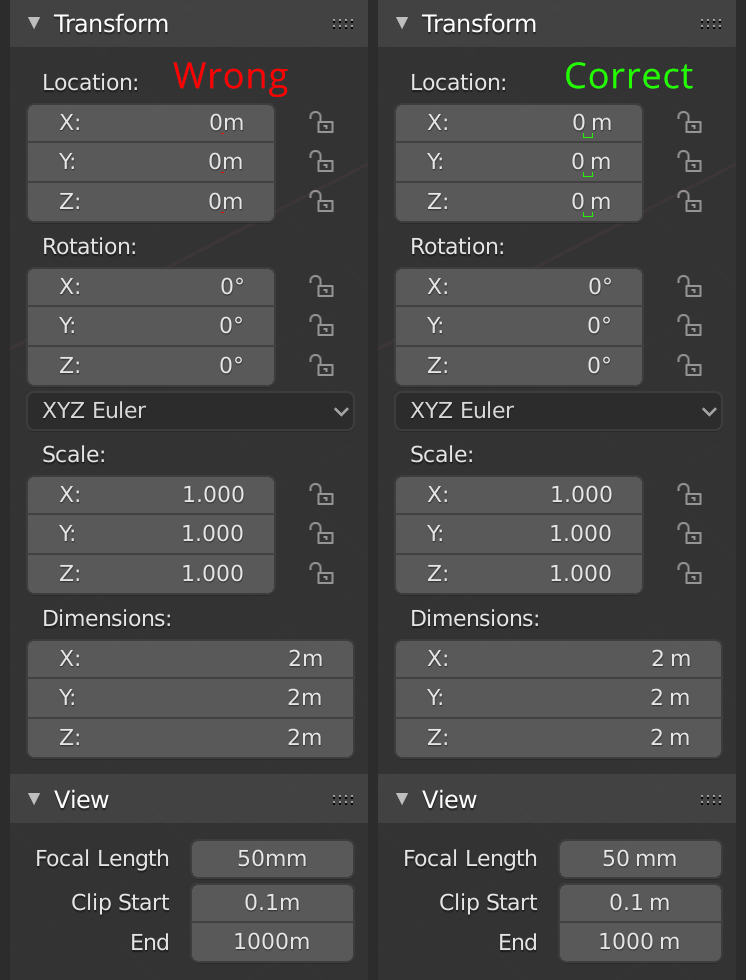
the spacing of Blenders units is wrong.
Wrong
1m
1mm
1km 450m 1mm
1px
1°C
Correct
1 m
1 mm
19 km 450 m 1 mm
1 px
1 °C
The only exception are angles:
2° 3' 4"
There are lots of discussions online where people suggest it was a matter of style or taste.
It is not:
nist.gov/pml/weights-and-measures/writing-metric-units
physics.nist.gov/cuu/Units/checklist.html
abacus.bates.edu/~ganderso/biology/resources/writing/HTWabbr.html
poynton.ca/notes/units/index.html
11 Comments
On the other hand, I don't want to have to type the space when entering values and units. Typing "2mm" should be accepted, then the validated input could be displayed as "2 mm".
of course, I agree 100 %. This should not decrease usability in the the slightest.
Being correct is important, and this is correct.
It's in 2.81 :-) ❤️❤️
developer.blender.org/D5051
It would also save some work when editing values. When you double-click the number in the current Blender system, it also selects the units along with the value.
This means this happens annoyingly often:
Blender units: mm
Current value: 6cm
Double-click the 6, then Press 9
New value: 9mm
Intended value: 9cm
This is stupid, lot of discussion that doesn't provide a single argument why "this" manner is better then existing one, except because it's right to do so. And if it means you need to hit another key everytime you type in values - that will decrease versatility, and I don't want it. Let's not distract developers from doing needed and and usefull features, just because missing spaces bothers your sight
* @lordvigore * I don’t suggest more typing at all. Actually I didn’t even suggest any different input. It’s only the display that should change.
So those inputs would all result in the same display:
6 → 6 m
6m → 6 m
6 m → 6 m
* @lordvigore * also, the argument is not to do it because it is right .
The current implementation is wrong ! Ans ot’s wrong for a reason: readability.
I dont think this matches the way blender works with typed commands
* @Peter Boos * hm, can you give an example?