
Better Looping in Grease Pencil
Currently the main way to loop an animation (besides just copying and pasting frames) is by using the Time Offset modifier. This solution has a few problems:
- It's time consuming. You have to create the modifier, tick the custom range checkbox, set your frame range, and then keyframe the modifier's Realtime and Render states on and off. Loops are a huge part of animating and should be fast and easy to set up.
- It's fragile. Because the start and end are hard coded as frame numbers, that means that if you retime your animation and shift the keyframes, the loop will break. You have to go back in and update the frame ranges every time you retime your animation.
My solution
Add a new keyframe type. It would be in the already available list of keyframes:
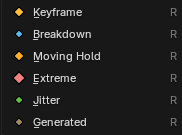
You could name it Loop — and unlike the other keyframe types, this one actually has a specific function.
When placed on the timeline, you could then set the number of frames you want to loop (this setting could be available by right-clicking the keyframe). If you chose 3 frames for example, it would take the 3 frames before it in the timeline and loop them. The loop would end once a new keyframe in the timeline was reached.
This solves the previously listed issues. It would be much faster to set up with far less steps, and the loop would be indicated by a keyframe in the timeline that would shift with the other keyframes when retimings were made.
2 Comments
Yes, a simpler loop would be great. The way you can loop object keys in the Graph editor, simply by selecting the frames and hitting shift E make cyclical, is so easy. Something along that level of simplicity. In the case of making this work with your suggestion of a type, above, then I would suggest just being able to select them visually and setting it to cycle them. Number of frames could work too, but a visual grab or select might be more intuitive for users.
Nice suggestions. Definitely not hard-committed to my solution... any solution that makes looping faster and easier would be great. You're right that a visual, more tactile way to choose frames to loop would be ideal.