
Opened Project Tab Bar
Allow users to have multiple projects open at once inside the same window, making larger workflows easier to manage and keep
tabs
on. Simple mockup below.
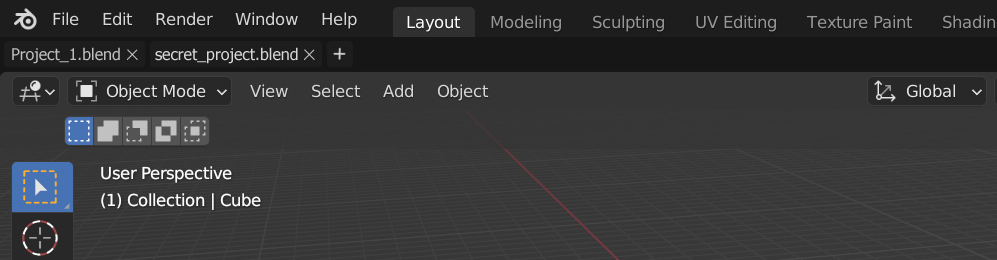
Allow users to have multiple projects open at once inside the same window, making larger workflows easier to manage and keep
tabs
on. Simple mockup below.
5 Comments
Id like to open more than one project, but not in the same window or the same Thread, id like to have two different instances of blender and the same version open. if one is frozen or is working on a long simulation task, i'm able to work on the other one at the same time.
+1 for this
i agree with your proposal in fact i suggested this months ago i hope they add tabs to blender
I have to ask. Have you tried opening multiple projects in multiple windows, and then found something lacking that made you want this tab bar?
If so, can you explain what is lacking in detail which will improve your proposal.
If you have not tried opening multiple projects in multiple windows, you are really missing out. As much as Blender devs brag about their non-overlapping window UI system, using multiple Blender windows for the same file or different files works amazingly well and allows a workflow some other 3d program users have never even imagined using.
If I wanted something like this I'd prefer the way it's done in Modo where several "files" are listed in the outliner and you can drag to move or copy file contents back and forth between all of the open files.
For your proposal to actually make sense visually it would better for the file tabs to be at the top of the window and the workspace tabs (and scene list and view layer list) to be below, because the workspace tabs (and scene list and view layer list) are a part of the blend files and can be different in each file.
That would sound cool in a world where there were no performance issues nor crashing projects. Multiplying the load in a same instance also means multiplying the risks and the consequent losses.