
New texture node: Shape Pattern Texture
A texture node that creates simple texture patterns of basic shapes. Texture patterns are useful all the time in 3D but even quite simple patterns sometimes require you to be a math node wizard. With the brick texture and the checker texture being part of blender for ages a basic shape pattern texture node seems like a natural thing to implement in Blender.

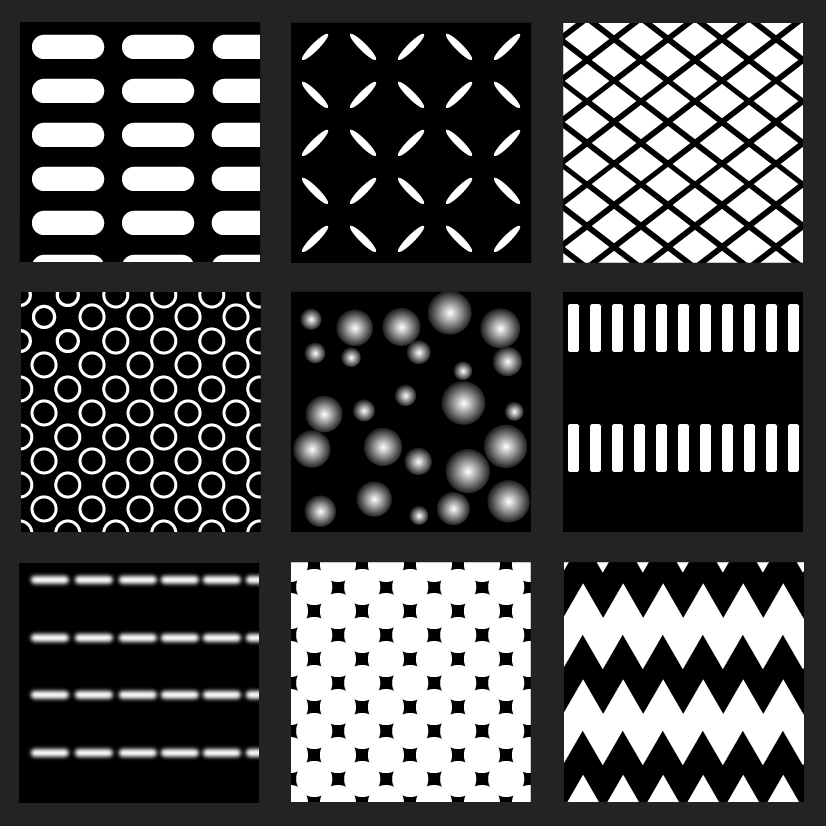
A texture node with some basic parameters gives endless options for creating textures. Here are some examples. A few of these combine two Shape Pattern Textures.

The parameters in the node could be these more or less and the naming could be different. The parameters should be pretty self explanatory - they function as follows:

- Scale: Overall scale of the texture
- Size: The size of the shapes
- Random Size: Randomizes the size of the individual shapes. 0.0 = uniform size
- X spacing: Spaces out the shapes in the horizontal axis
- Y Spacing: Spaces out the shapes in the vertical axis
- Random Position: Randomizes the position of each shape moving it on both axis away from its origin
- Rotation: Rotates each shape around it’s origin
- Random Rotation: Randomizes the rotation of each individual shape
- Squeeze: Instead of having two parameters for X and Y scaling of the shape (while they retain their position) this is just an idea to combine the two, so that a Squeeze value of 1.0 squeezes the shape to 0 width on the X axis and a Squeeze value of -1.0 squeezes the shape to 0 width on the Y axis
- Offset: Offsets the shapes in every other row
- Roundness: For polygon shapes the corners are rounded. For the circle shape nothing is rounded
- Smoothness: Smoothes (blurs) the hard edges of the shapes
- Fill: Fills the shapes inwards allowing different sizes of border thickness. 1.0 = completely filled
The primary reasons for this proposal - besides it’ useful - are:
- Accessibility: You can find amazing node groups by talented people all over the internet but these are limited to the few people that find them. A built-in texture node in Blender will benefit all Blender users.
- Performance. A native texture node would probably perform a lot better than a huge node tree/node group doing the same.
- Simplicity: One simple node will bring a lot of functionality.
There might be obvious reasons why a node like this has not been developed? If so I am not aware of them.
14 Comments
From me - will be better to implement it as some separate from material editor " texture node editor " and not as one node but as separate nodes. Separate nodes constructor will be much flexible (you may want to iterate/interlace some type of transforms ) . Then result from this special editor as special generated texture use in material Image Texture node.
I was trying to make a simple procedural polka dot texture the other day. Making a circle was easy, but I couldn't find a simple solution to tile it without complex math node wizardry. I'm on board with this feature request. It'd be so helpful to be able to tile textures procedurally.
* @BlenderSplendor * It took me 30 minutes but now I have a grid of dots... just need to figure out how to offset each other line of dots to make polkadots... :(
* @thinsoldier * Lol, I just gave up after half an hour and took a screenshot of a circle made in Pages (an Apple word program). Instant (non-procedural) seamless polka dots texture.
* @BlenderSplendor * Why not using particle, just curious?
* @BlenderSplendor * You could have just made a circle in Blender and render/screenshot that and then use it as a texture. No need for Pages.app
* @BlenderSplendor * Polka dots are quite easy with Voronois with Randomness=0, thresholded with a Math node set to Greater than. Copy the 2 nodes, offset X&Y coordinates by .5, and multiply the outputs, to get the dots in between (hexagonal pattern). There are quite a few tutorials for this.
To tile any shape, see e.g. Erindale's tutorials: youtu.be/nm3QRLe846M
I guess some of this could be made much easier with an asset manager for nodegroups ; not sure if implementing a random bunch of textures into the engine itself would be worthwile.
* @snieb * I agree we shouldn't put a bunch of textures into Blender because it'd increase loading times. I just want one new node that tiles the image plugged into it. Thanks for the tutorial, but it was still a bit beyond my skill level.
Took me a year and a half but I finally understood these instructions. It's not quite as simple as you make it sound.
It's crazy that's this have been requested 5 years ago and this still isn't the priority, aren't they're about everything nodes? Well start with this one!
relevant development effort:
devtalk.blender.org/t/raiko-texture-components-feedback-thread/36652/20
Great idea. Would be great to have basic nodes where I can draw simple shapes (circle, rectangle, poly shape) and then some ways to create patterns out of them. Or use them as inputs for other texture nodes.
I think this should be available in GPencil as well, based upon common grid patterns as used in graphic industry. Think of BW commics dots/lines/etc
I'm all for making procedural patterns more accessible, and the particular algorithm you're proposing seems pretty neat!
I think the main issue here is finding the best algorithm structure/parameters that can be kept in Blender for years to come? Breaking backwards compatibility is always a huge (or)deal, so it would crucial to nail the basic structure of the node from the start. Future extensions are possible, but they shouldn't fundamentally change how it works.
While such a node looks useful, I don't think there's one single obvious / mathematically principled / standardized way to go about it, like with a Checker or Musgrave node. The Brick node is already pretty idiosyncratic, and a bit weird.
I have high hopes in the coming asset manager , which should make user-made node groups easily accessible - maybe Blender could even ship with a few really broadly useful ones, e.g. the one you're proposing?
Then the biggest argument to include it as a proper hard-coded node would be performance . I'd love to see some data on that. Has someone e.g. replicated the Brick node with simpler nodes, and done some benchmarks?