
Better light gizmos and proper light targets with gizmos
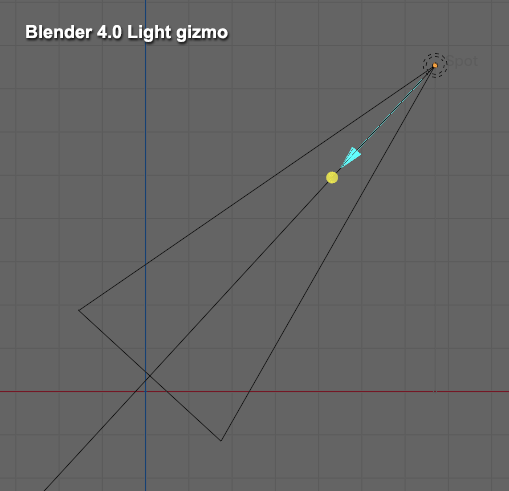
Lights that can be pointed should have proper gizmos. Now lights have strange yellow dot that can be pulled. It is very close to the light source itself, and you can drag it, but as soon as you release the mouse button, it snaps back. Really strange way of doing things. Also, light cone shape is huge. Why?
This is how light gizmos look in Blender 4.0:
How it could be changed:
-
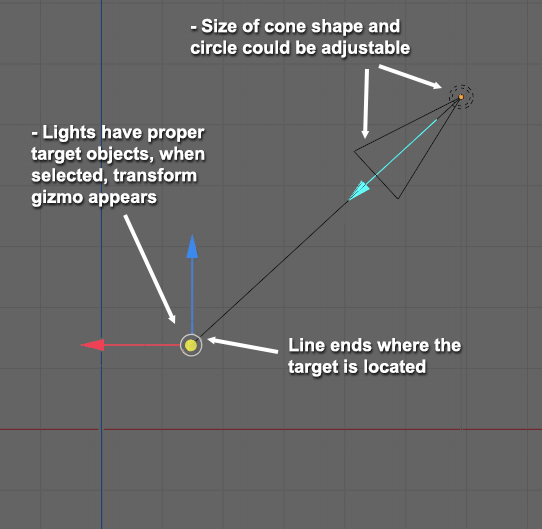
Make lights have a target
-
When user click target, a typical move gizmo would be shown
-
User can move the target with gizmo, and when mouse button is released, target stays on its current location
-
Also, end the direction line on target location. Now it goes further, this makes no sense
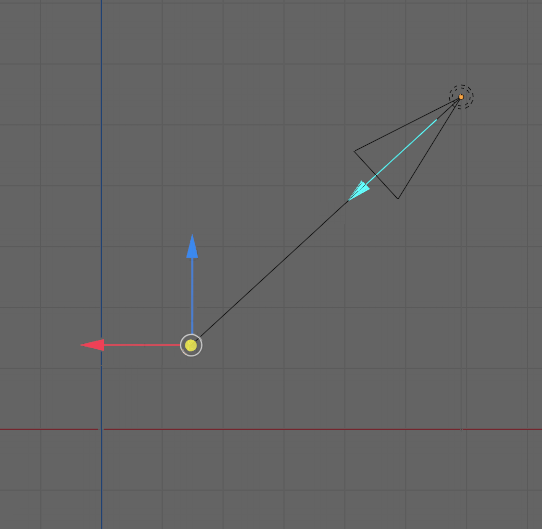
Also make the spotlight cone shape size adjustable, now it is huge - and unlike area light, its size can't be changed. Doesn't matter if it makes any difference for rendering, but in scenes where you want to see many light gizmos, it would be best that user can customize the size of these gizmos, so that those won't clutter the scene view.
3 Comments
The line indicates how far the spotlight shines. It corresponds to the "custom distance" property, which is adjustable in the light properties. So in an alternative design the line must either be kept or the target point should correspond to the (custom) distance of the light.
Well you can scale the light object like a mesh object and that will change how large the cone is displayed in the viewport without changing any properties of the rendered light.
In its current implementation all light properties are visually separated. The yellow point indicates direction only, the line indicates distance only and the cone wideness indicates the angle of the spot shape.
So one question is, if the yellow point should depict the (custom) distance of the spotlight, too and if the length of the cone should also correspond to the actual spotlight size/reach. Both ways have their advantages and disadvantages.
If one wants to display the range of light effect, I'd make it another line, cone or sphere or whatever is needed, maybe with dashed lines and I'd keep it optional so that one can hide it. But the actual thing depicting the light source itself shouldn't be that big as now (these two should IMO be two different things). When we nowadays have realtime lights, I'd personally adjust lights with render preview anyway, not using some wireframe or lines which are only readable when lights are aligned along main world axis. I know I can scale the light to make the cone smaller, but IMO it is worst kind of way to make it smaller, I never ever scale anything unless it is for animation, otherwise I keep stuff at 1,1,1 scale. I can draw a picture if this description doesn't make sense. Yellow point should not depict "custom distance" but a target. If I create lighting for a room, I'll place the target on floor. Now it is not easy to estimate where the center of a spot light will be on floor surface (for example).
yeah the yellow point as target absolutely makes sense (at least as an option). It would be much more comfortable than creating the "track to" constraint with an empty, which clutters the scene.