
Questioning Blender's meta measures, scale, etc
Intro: My idea is about questioning validity of notorious Blender scale. Why is it there? Who needs it? Is this some remnant of ancient code that somehow left unnoticed and forgotten as Blender grew? And that little, temporary black property panel. I like it, but I find it weird it exist. I will get to this in maybe another post. And meters as units? That's really weird.
Case: For example, I need to create a box 34cm wide, 57cm long, 78cm high so I want to start with cube.
Cube Blender has is 2m. And is in scale of it is.... 1. Something one. It's not percentage, but it kinda acts like percentage. Ok. I won't mess with that. But actually, I have to because there is no other way.
So... I will just have to adjust scale to be 0.34 0,57 0,78
I am getting somewhere. BUT.... I can't work with my box in this scale. I have to apply the scale because I will get unexpected results if I don't.
And it's 1 again. And client calls me saying, hey buddy nice work can you maybe change its width to 35.
Sure. How hard is to change width of the box from 0.34 to .035 after it became 1. I will just... calculate some percentage I applied. Increase from 0.34 to 0.35 is 2.9411764705882213%
And honestly that's stupid.
Case 2:
I need to create a match box in real size. Blender has meters as units. Ok. I will just make 0.02 x 0.03 x 0.005
And I will get puny little box. No problem.
Possible solution:
However much I like it, that Blender specific little temporary property panel on creation of primitives, or many other actions, maybe needs to go.
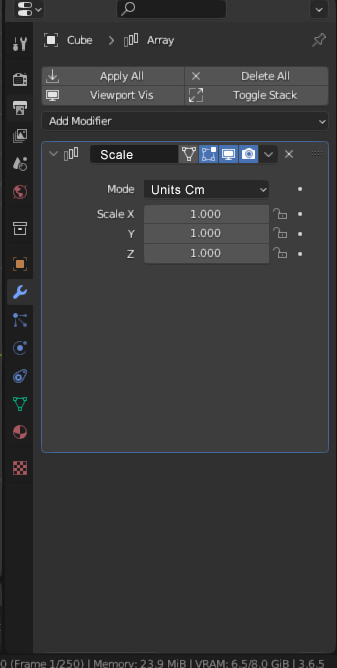
I don't suggest new primitives. Blender has modifier stack panel . Why not putting those properties there in sub-stack. Cube primitive could maybe use width, height, length and maybe even number of segments but that's up to you.
What I would like is properties of object in modifier stack, and then bellow that stack, a scale modifier, and all other modifiers.
Would I collapse all modifiers in mesh at some point? Sure. I do that all the time.
Units: Just add option to change m to cm. Everything is the same. but it's cm. If I am making small object. It's cm. If I am making a house it's m, and if I'm making a mountain, it's km. If I append my match box done in cm, into my house done in m., It will just be in scale, some small object somewhere.
Scale: Does Blender really needs scale. It seems whatever you do, object at the end must be treated in scale 1.
If I scale object, can I scale it in units. Put that Blender scale 1 somewhere behind hidden of us. Let Blender always know its scale 1 it desperately needs. We, we see 97.6 units on y and 223.67 units on x.
We scale y more, and we get 147.54 units. (Blender knows it's 1 and don't bother us again with that)
Client wants something scaled up 450%. Ok. I just type 450% in y and there you go. It's 1372.509 units now. (To Blender, somewhere deep inside his code, it is still 1, because Blender likes it that way)
I hope I explained it well and that I was entertaining. In case I don't know to use Blender and it's scale and measures properly , which is quite possible, than all this I wrote will be obsolete.
Thank you for such a great software.
6 Comments
While you might not understand the reasoning for a self-scale value, there's reasoning for it. It is a basic concept in 3D applications, not merely Blender.
With a scale of 1, the self-space coordinate scale of the cube is 100%, or a 1:1 ratio if you like.
If working with scale + dimension presents a headache for you, them simply do not scale the object, in object space. Do all your adjustments in Edit mode, and the object scale will always be at 1.
Dimension Scale and are two very different things:
In 3D programs, scale is pragmatically used as a factor. The final dimension is the original object's dimension, multiplied by the scale on each individual three axes.
The default cube is of a dimension of 2m, and a scale of 1. Set the scale to 0.3, 2 or 10, and the dimension would become 0.6, 4 or 20 respectively.
If you want to set a specific object dimension, use the object's dimension inputs, not the scale:
If you want to do precise modeling, like modeling parts or architecture with measurements, you should look at addons like CAD Transform 2.0 for blender 4.x . Or at programs that are actually designed by and for CAD.
A few well known free open source solutions are Sweet Home 3D , LibreCAD and FreeCAD .
Free proprietary solutions are Autodesk Fusion and Sketchup
The common paid proprietary solutions are Autodesk AutoCAD , Solidworks , Catia
Oh I know. Just wanted to be clarified that Blender use it as some sort of factor. I had my lesson about scale and dimensions way back in v2.7 like all novices. :)
It doesn't confuse me tho. I know about it. I am talking about thousands of novices that are using tools that are at their disposal right when they start working in Blender and ask for help on Redit because they didn't apply the transformations. Which is something not that obvious.
And look, when you entered dimensions, scale changed too. Now would you need to apply scale transformation to your object? Making its entered dimensions obsolete. Again 1 by 1 by 1.
So my real question is is do Blender need this scale? Or better, I think Blender need it, but do users need this scale, or they can just have dimensions with Blender knowing this factor somewhere inside, without bothering us.
Sometimes novices need to spend time learning concepts in 3D applications. This is one of those times.
And yes, I have actually utilized the scale factor when making adjustments for various things to match - well, scale. It has its uses.
If the issue is the need to learn, isn't the solution also the need to learn?
There are ways to help in that, but there isn't much the software should/can afford to do. Definitely not hide the things to pretend they are not there, it's just delaying the issues from happening, if not making them worse, and get in the way of people who already learned their stuff.
I had to make a bunch of geometry node assets to make non destructive primitives that let me specify dimensions. I wished I had known about geo nodes a year ago. Hopefully all modifier functions will be available from geo nodes in the near future.