
Interractive modelling guided tutorial system
I've posted this proposal on Blenderartists about an year ago, but since the revival of Blender 101 project, in the context of Blender 2.8, I thought of posting it again here.
This proposal is about a tutorial system that helps new users understand the principles of modelling, by following pre-defined scenarios. The system could also be helpful for more advanced users, by highlighting various techniques useful for certain situations. To better explain how this proposal works, I will give now a practical example:
-
The user selects from a list which tutorial he wants to follow. Let’s say there could be a tutorial about creating a simple cube, with an extruded edge. Tutorials could have a special file format, so they could be created, loaded or shared by the Blender community.
-
A message box appears in the top right of the viewport, telling the user which keys he needs to press in order to create a cube. In the same time, in the viewport, a semi-transparent representation of the cube appears. (for simplification, we will refer to semi-transparent objects and mesh components as reference objects/mesh components)
-
After the user presses the keys, the solid cube appears, its vertices matching the ones of the reference cube. If the system determines that vertices of the real mesh match the ones of the reference mesh, the tutorial proceeds with the next step.
-
The tutorial box updates, telling the user how to select an edge of the cube and extrude it. That edge highlights in white, letting him know that it should be selected.
-
After the white edge is selected, a reference face appears, extruded from it.
-
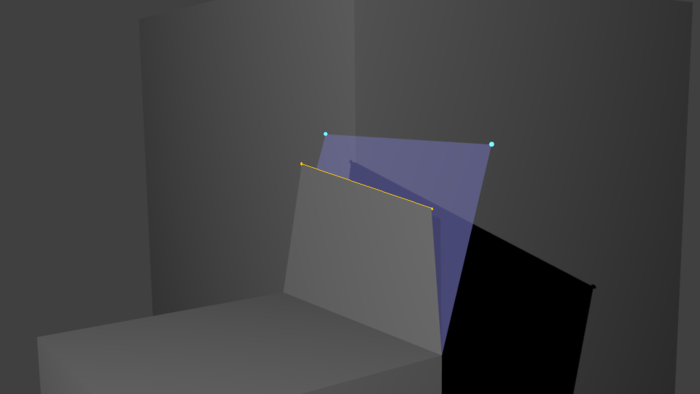
The user extrudes the edge, moving the newly created face in such a way so its vertices match the reference one. ( see image )
-
After the condition is met, the tutorial could proceed further, telling the user again what components he needs to select and how to transform them, to match the reference ones.
In order for the system to determine the difference between a real vertex and a reference one, there should be an ID system.
Now for tutorial builders: For creating tutorials, there should be a special key that, pressed, records the state of the mesh in that moment. Basically, it creates some sort of ,,snapshot”. A tutorial file is made up of multiple ,,snapshots”, taken by the modeller in the order of mesh creation. The ,,snapshots” could also be annotated, so they appear in the message box as instructions for the final user.
2 Comments
Perhaps the Unreal 4 Editor could serve as inspiration? Not quite what you describe here, but it has a really nice built-in tutorial system (as of the current version). Might be worth looking at for ideas. unrealengine.com/
This is a proposal that's been in discussions for a long time (at least since the 2.5 refactor). It's still a strong idea, but I think it needs to have a more well thought-out proposal. What does Blender's user interface look like in this tutorial mode? Where do the text pop-ups appear? Is audio supported? For tutorial-makers, what does the workflow look like?
Mock-ups of how you envision these things working are essential to making this an actionable proposal.