
Lock Mouse Wheel Scroll Action to current field
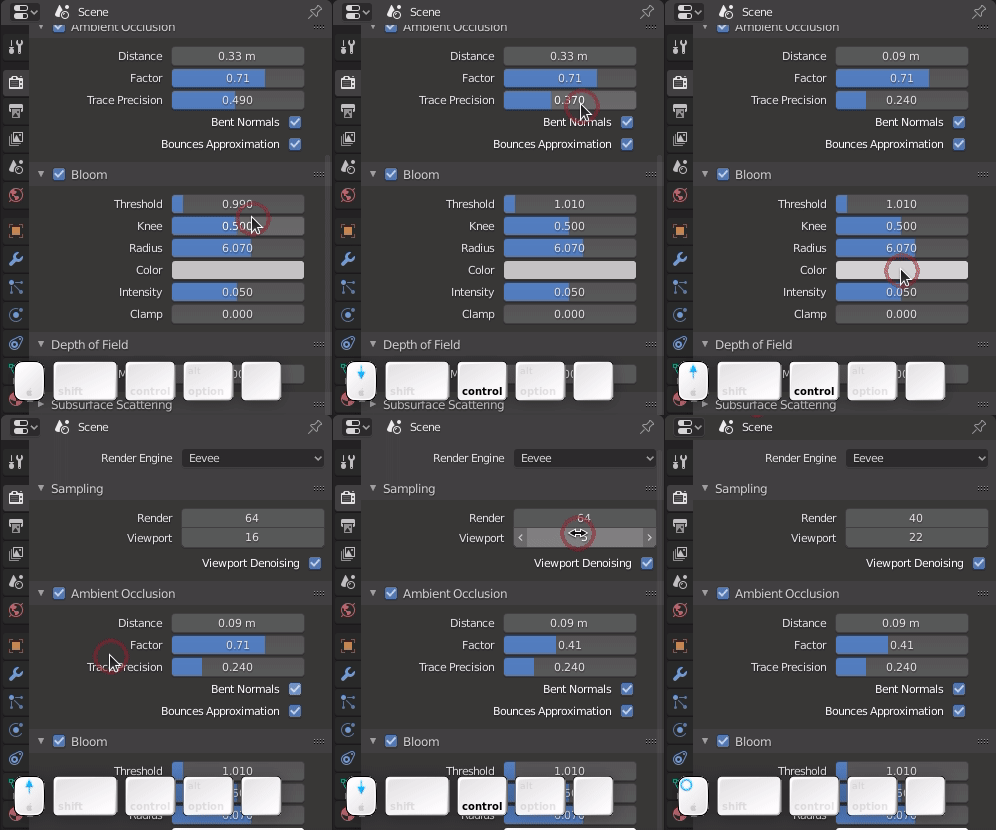
In Blender you often have to fine tune some parameters by using Ctrl+ mouse scroll wheel. At the same time you need to look at the screen to see the results. The problem is that if you move the mouse a little bit you start scrolling accidentally another random field messing up all the fine tuning and make an unpredictable mess with other values.
My suggestion is: when you modify a field with the mouse, lock the mouse arrow position until you release the Ctrl button, this prevents mistakes allows you to concentrate on the results on the results in the 3d view panel .
8 Comments
Upvoted. Maybe this could also help with Properties Editor accidentally changing panels (with Ctrl-scroll) if mouse cursor "falls" on empty space around fields.
AND it should refuse to start to change field value right after panel swap (if Ctrl is still held) - but this would be another fix.
I think I understand what are you talking about. If my mouse was less stable - I could reproduce this problem, but it's sitting still while I'm scrolling :) I guess, touchpad users may be more affected by this.
* @ErminOS * thanks for the support :-) Still not many upvotes, probably I wasn't clear enough.
But if you need to change many fields at once... it's gonna be a pain to push / release the Ctrl.
Not sure about what you talking.
It's hard to do mistakes accidentally.
* @ManBlender * select a field, press Ctrl+mouse scroll wheel to change values, if you move the mouse a little bit when scrolling the wheel, you start to change random values in random fields. I'm suggesting to lock the mouse position in the field current until you release ctrl, this prevents accidental mistakes. Is the description clear enough? If not please suggest me how to modify it, thanks
* @giannife * Still not understand. With ctr is different type of incrementation or decrementation for values. It's depend of type of main value, eg. 1.0 or 0.1 etc, With ctr you have steps (rounded), without is precision changes.
You must explain how you changing accidental the values, coz I can't reproduce this, but maybe you used different settings or other type device like laptop?
* @ManBlender * Where are you from? Your english is worse than mine!