
Axis snapping for Cut tool.
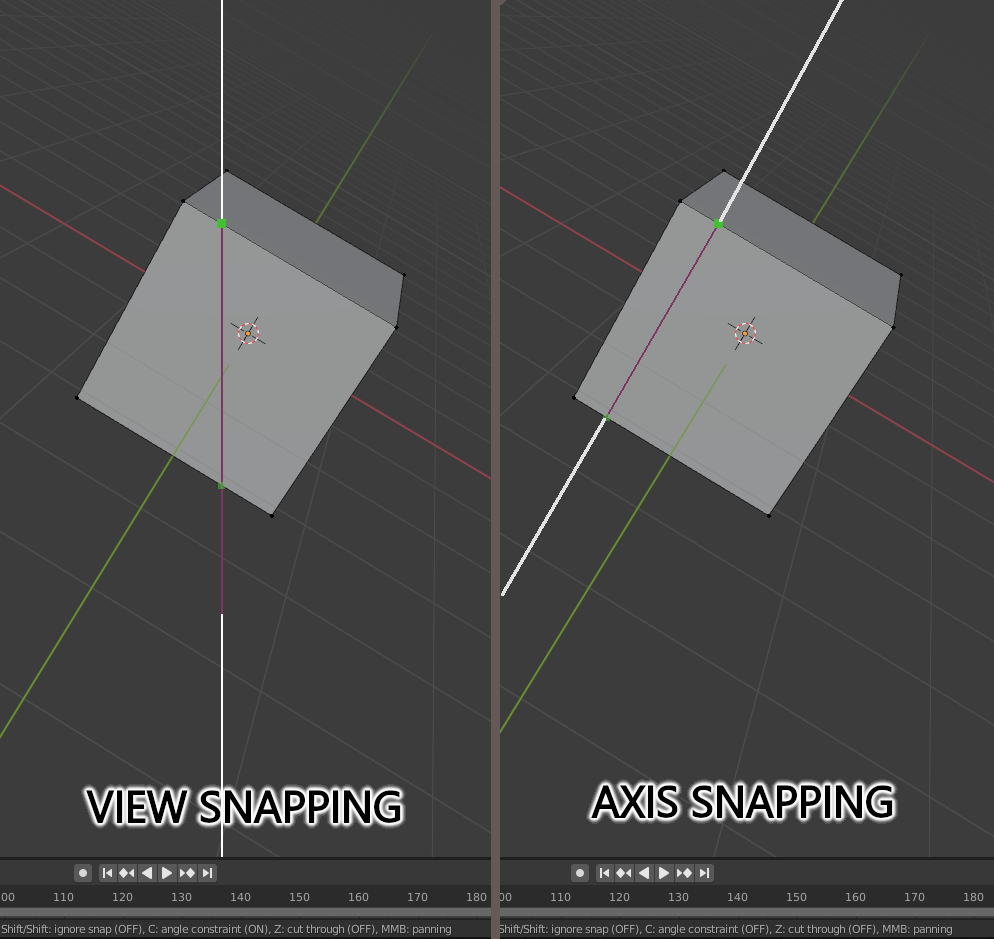
By default, when you use the cut tool and press C, snapping is relative to the viewport. Quite often it is not convenient when you want to slice evenly, you have to switch to frontal or other view.
Solution: add ability to switch snapping between view snapping and axis snapping.
7 Comments
It's already implemented in new GSoC build "Blender 3.0.0 - soc-2021-knife-tools" builder.blender.org/download/experimental/ It have some issues, developer known about them.
So test it, and if it what you need, then mark proposal as "Done"
Checked, yes indeed there is such a function, albeit very crude at the moment.
Strange, I can not find the tab where you can change the status to ready.
imo marking this proposal as "done" before it is merged into master is premature wishful thinking. I've been around long enough to know the disappointment of seeing many GSoC's that have not been merged into master for one reason or another, despite having a lot of positive feedback and excitement. I would wait until it's in for real .
@testure agree,
I suggest topic-starter just keep eye on it after release, and then update status
You can change the status to - Done.
it can be archived through snapping options, so when the cut is made snapping gives a visual indication at the 2sec edge that the produced cut will give an equal amount of space as the first point made on the first edge, which means the cut is parallel to the nearest edge