
Separate Image Texture node into Image Select node and Image Sample node
Currently, there are only one way to change an image inside a group node, that is to open it and change manually. But when you build shaders that play with coordinates, you would usually want to be able to just plug the image in the group that contains all stuff and have it work without bothering about it. What if you have several copies of the same image, for example, like if you want to shift channels to have color distortion?
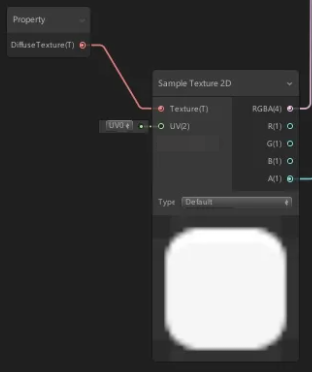
Changing images right now is not easy, and i would really appreciate if devs changed it into two nodes instead, like Image Sampler node, that takes the image and coordinates as an input, and Texture node, that just let's you select the image, and plug it into Sampler. Like Unity Shaders Graph does.
Then you would be able to add image from outside, and whatever happens to it's coordinates, how many copies it has, and whatever else won't be a tedious problem anymore for the user. It would be especially useful for those who share their node groups with others. No need to open up the group to plug your own image.
1 Comment
I think I'd need more than my two hands to count the amount of requests for that.