
Fix the input order of combine nodes (Mix, Alpha over)
The mix node is one of a few which adds one image input over the TOP of a BOTTOM input.
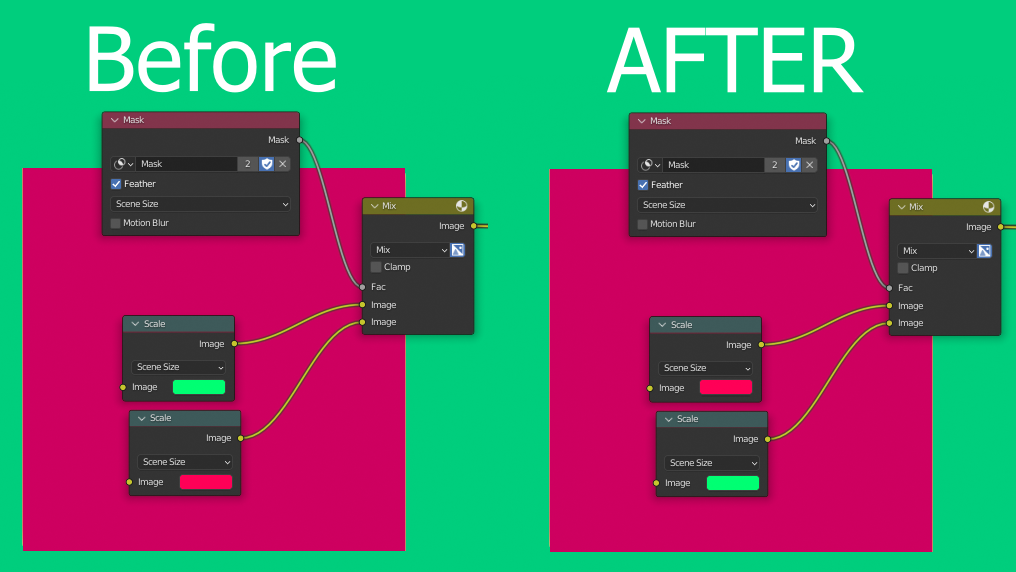
The PROBLEM is that the top image goes into the bottom, and and the bottom image into the top. The order of the inputs does NOT align with the outcome of the image. I use nodes all the time and have trouble convincing people to accept these strange idiosyncrasies.
When people look at nodes they see a scary spaghetti nightmare, so we have to reduce obvious pitfalls that allow the user to expect the wrong outcome. It's not expected behavior from literally anyone who's used Photoshop or any layering system.
It's the exact same logic as if we went into the VSE and the top layers were REALLY the bottom layers. Doesn't make sense.
I suggest we invert the order of the mix node inputs and provide a code that tells old blends to invert so that when you save an old blend again, it's compatible with the new way.
0 Comments