
Sculpting brush UI: arrow to cross cursor replacements
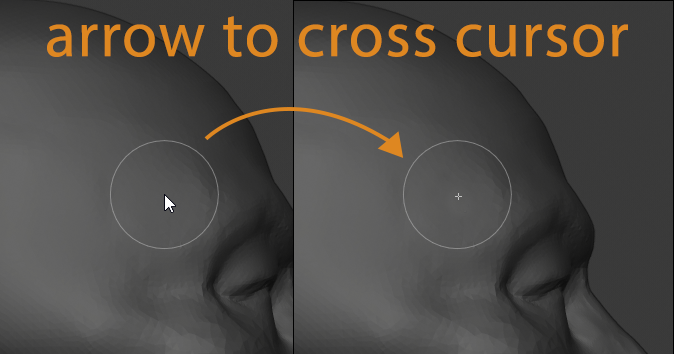
While working with sculpting brushes there is a mouse "arrow" cursor inside brush radius outline. It does not make any sense to sculpting (at least its shape) and moreover it's large and "hide" part of the model under the cursor - so it's really break sculpting experience.
PROPOSAL: Replace "arrow" cursor with something tiny and semitransparent like "cross" just to mark brush center point. For more user-friendly way maybe it would be good (if technically possible) to have tweaks for it's size/ color tint / shape variations(from limited list) and also let user to choose show or hide cross (just like option we already have to hide brush outline but for "central" point marker).
9 Comments
cross is already done in sculpting branch, so sometimes it will be merged into master.
* @ Vyacheslav * Thanks! That's good news! I tried that build. I hope at merge time that default crosshair would be customizable or at least not that "sharp" (more subtle in other words).
ran into cursor hindrance
based on your suggestion I've made simple script github.com/Begalov/sculpt-cursor-hide
when called from search it can hide cursor in Sculpt mode when mouse over View3d and bring it back over other areas, but if mouse get back to view3d cursor still appears
have no time to get it done (
also checkbox could be appended to VIEW3D_PT_tools_brush_display_custom_icon.draw()
it was important for me to show that the task is easily accomplished with API
everybody welcome!
* @RUben * thank you! it works as you described. Also I tried to replace NONE to CROSSHAIR to try cross cursor variant - yes it almost that I expected. But CROSSHAIR imho is still too large and contrast (+non transparent). To add custom semitransparent tool cursor icon we need to build Blender from source - am I right? Not everybody can do it by self, so I wish this feature will exists in official Blender distro.
And yes, we still need to find out how to fix reapearing of mouse cursor. Wish I can do Blender python well(
Marking this as Done. If for some reason it isn't, please report it as a bug.
what about not putting anything, and leave it to be as a circle only. because the middle indicator, whether it is a mouse or any kind of shape, will not affect the operation.
* @ramsn.anwia * I think about that too and it could be user choice to show/hide central point marker. Also for some cases it's still usefull to see "core" of the brush (like crease for example).
Could you please separate this into two individual posts so each idea could be discussed and voted upon on its own merit?
* @Jason van Gumster * It's done.