
Expanding of extrude tool for edges
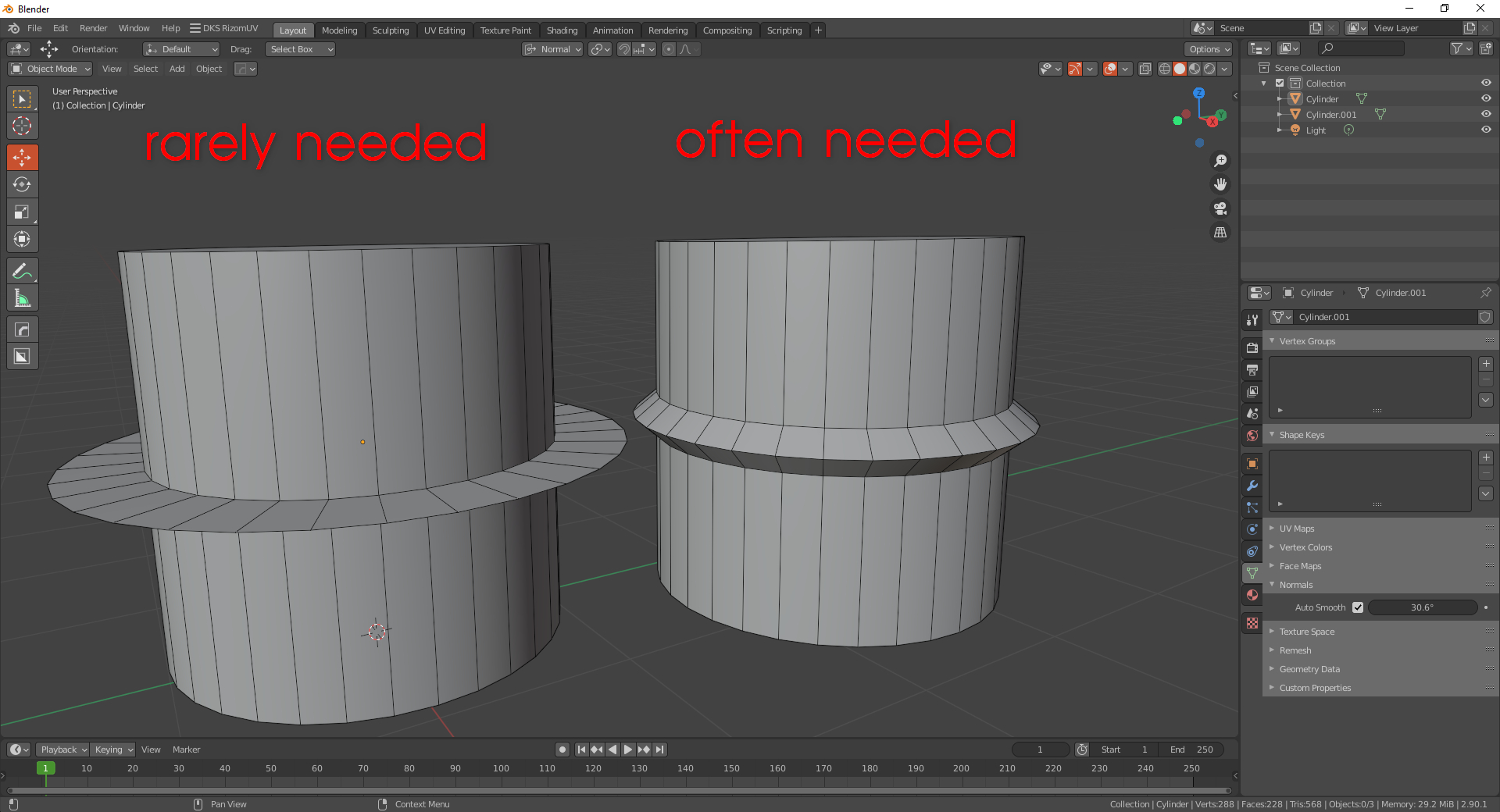
At the moment, the edge extrude function is very limited and makes little sense. Now, if you apply the extrude function to the edges, you will get polygons without thickness and without the ability to adjust the bevel, cases, when it is necessary to get the polygons without thickness with the, extrude of the edges, are very rare! More often than not, people want to get a bevel that can be adjusted. This function can be implemented as an extension for an edge extrude tool. Now, to achieve this result, you need to perform 4 actions:
create 3 edge loops select middle loop move the outer edge loops scale the middle edge loop
Why can't we combine these individual actions into a single function that can be simply added to the extrude tool? As a result, we select the edge, press the extrude tool, and immediately get a 3-edge bevel with the ability to make width and height. This function can also be part of the Bevel tool. This way we get rid of the heap of unnecessary actions.
10 Comments
you can do this by bevelling, then insetting and holding Ctrl
* @meutzitzu * Thanks for the advice, but it partially solves the problem, you still need to take extra action.
This does not make sense to me. The one on the right is indeed more often needed, but it has nothing to do with extrude in my opinion.
If you want the extrude to automatically do this for you, think about it, it will automatically bevel the edge loop you have selected, does it sound right to you?
Why in the world should an exrude tool automatically do a bevel before extruding? And what if the one I want to scale, after beveling the edge loop, is not the middle one, it is the top one, what should the tool do? So basically, it needs to know how many loops you want for the bevel, and which loop or loops you want to scale after bevel. To be honest, I don't think that's what the extrude tool should be doing.
* @zhouzijun2000471 * This feature is perfectly implemented in 3ds Max, it has proven itself at its best and has been tested for years, it can be called an example for any 3d editor, check out how edge extrude works in 3ds Max.
* @zhouzijun2000471 * i think you're being too rigid with your definition- if you boil it down to the basic action that's happening on the right, it's definitely an extrusion. sure there was extra supporting geometry added to make it happen, but it's still an extrusion.
+1 from me, i think this would be an interesting addition to the extrude toolset
* @testure * Thanks for your support
This guy switch from 3ds max to blender. I will just say forgot your ex-lover and enjoy your life partner.
* @mrajendra2150 * this is crude and unnecessary. if you can't see how additional tool options are a useful improvement then why are you even here?
* @testure * Blender has its own tool. dont mix with max, I know 3ds max has extrude option for this. in blender u can just bevel the edge with 3 loops and after that simply grab the middle loop and press Alt+s. it will do the job, easy.
* @mrajendra2150 *
its easy! just follow these 4 steps!i take it you do not actually have a job doing any kind of 3d work if you're not concerned with efficiency. Never do something in 4 steps that you can do in one- the fact that you're even resisting such a proposal tells me that you're coming from a place of childish favoritism and not an actual interest in improving Blender. So again I ask- why are you even here?