
Easy keybind for switching Smooth
Hey everyone, I'm approaching blender sculpting tools. I noticed there are 2 main things I'm missing from zBrush:
- Switching between 2 different smooth modes by releasing the Shift button during the smoothing (laplacian and surface);
- Fast switch between 2 different subdivision layers by pressing D (to increase subD level) and shift-D (to decrease subD level).
Someone mentioned that you can subdivide with ctrl1,ctrl2 and so on, but I would find it easier to run through layers with an "up" and "down" keybinding.
Its a very common steps I find myself doing over and over and having to manually select it each time is extremely time consuming, to the point of making me unable to sculpt within a reasonable time frame.
I also can't get to customize this in the preferences, so could anything be slim the workflow down with some keybinds?
5 Comments
by default, you can change the subdivision level with ctrl+1, ctrl+2, etc.
* @testure * Thanks you are correct indeed. I changed the title.
* @faccoli.michele * read your updated proposal- this is still possible with blender as it currently is today. just change your keybinding to look like this: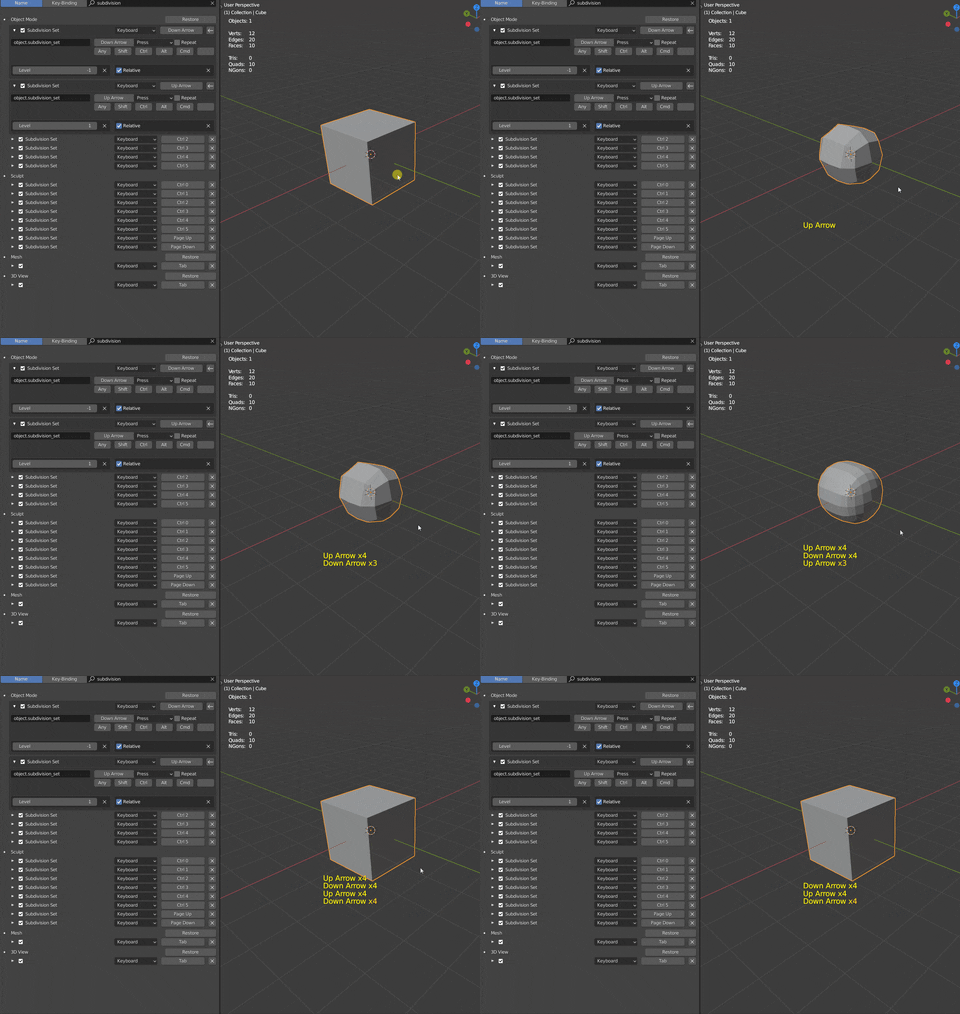
* @testure * Thanks you are correct.
Hope to see the update on the smooth, though I doubt since I got such a warm welcome right away in karma terms. Guess blender community has its up and downs.
* @faccoli.michele * it happens, and tends to happen more frequently when you combine multiple proposals into the same post- people might be downvoting for one thing but not the other, hard to say