
Loft tool in Blender
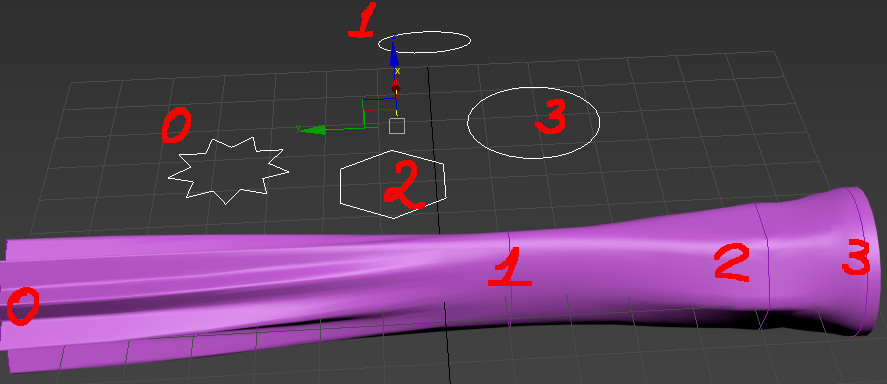
There is an interesting tool in 3D Max. Loft use splines sections to build a form. I think sometimes it can be useful, so it would be cool to add this tool to Blender.

Now Loop Tools addon have loft option, but it doesn't work properly.
8 Comments
Loft is a great tool that I've used in Autodesk Inventor several times. It's a great way to "bridge" complex shapes into one smooth object. This would also help in the areas of organic and hard-surface modeling. As mentioned before, the needed ability to have it in quads is important for subsurface. Converting the lofted object to mesh object should have a resolution option (value slider). This would allow people to apply a subsurface modifier from a lower resolution mesh, or create a high poly mesh right from the start.
FWIW, this is already possible in Blender if you use NURBS objects. It's very basic and requires each piece to have the same number of control points, but it does work.
Refresh my memory, does Max's loft operator work on meshes, or just splines?
@Jason van Gumster: Splines only. It's very robust though, giving you control over twist, scale, and a few other parameters iirc which are controlled with curve graphs.
For what it's worth (not much I'm sure), I really never found this tool too incredibly useful once better methods came in to being. Back in the 90s it was one of the few available options for going from 2d to 3d, but this method was used before SubDiv modelling existed and 3d bevel capability was in 3ds.
this could be very useful , but please make sure we can do this with non closed curve either
Suggestion is excellent! While Blender can do this in other ways, something more direct and interactive speeds up the modeling process.
Your proposal possim aspects similar to my personal proposal, posted in this forum months ago. Look link:
youtube.com/watch
how is this different from bridge edge loops?
@arturo.leone: You can't apply bridge to all shapes automatically. E.G.: I selected all figures, pressed "Bridge". The result I had:
So you have to connect these forms manually one by one. And recalculate normals.
Also these transitions are too sharp:
Bridge Tool generates a lot of triangles, so it is impossible to use subsurf modifier to solve this issue.
In 3D Max Loft works with curves, not meshes. I think curves are better for this purpose.
@admin2: you can resolve a lot of those issues via the f6 panel. But I agree that the curves workflow is a different approach