
Smoothing groups (+ Edit Poly) workflow
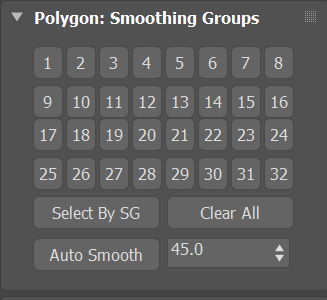
Key to hard surface concepting in 3ds Max is the use of smoothing groups in conjunction with the Edit Poly modifier. Please introduce this to Blender, because it provides more options whether or not to smooth adjacent faces than mark sharp provides. It may also aid interoperability between Max and Blender. See Arrimus 3D's explanation of Smoothing groups
11 Comments
So, forgive my ignorance, but how is this better than the mark sharp workflow? Asides from interoperability between 3ds Max and Blender. What other things does this provide that you can't easily do in Blender?
The reason why I ask is because asides from having 32 face groupings, the end result between this and the mark sharp is the same.
* @scott * With smoothing groups you can determine which sets of polygons should be shaded smooth, those that belong to different groups are considered as hard edges. The advantage of this system is that Catmull Clark subdivisions (Turbosmooth in Max) take this into consideration, meaning that support loops will only have to be added towards the finishing stages of the model.
* @Hologram * yep, tsmooth by smoothing groups very useful option..
Also smoothing groups don't impact performance, Blender's autosmooth drops it half whether in modeling or in animation. This is a long standing issue with this feature that needs to be solved for better performance.
About interoperability. Blender has no problems with understanding normals come from Max and marking correct sharp edges from smooth groups.
From my own experience. For Blender -> Max smoothing:
Why Max (cost $1,620 /year ) itself can't do things same good as some script (cost 35 $) - question to Autodesk.
In general - today's Max is pretty corpse, warmed up to look ruddy.
I switched from Max to Blender something ~ 2 years ago. Max still do number of things really good, but IMO smooth groups is not one of such thing I missed after switching.
Sadly, this way doesnt work (anymore?) No matter which way you export from blender, there are no smoothinggroups in 3d max after import.
Why you get only 3 votes after day - on words " ... because it provides more options ... " Blender users starting to laugh. Check youtube for Blender and hard surface.... Keep learning, start from small something.
Maybe, after face groups will be implemented ( already work for sculpt mode in 2.9 ), devs also add some implementation for smooth groups. You not the first and only one who ask for this.
* @IIIFGIII * As a new user, it is usually hard to tell what has been requested or hasn't been if it does not show up here on Rightclickselect or on google searches ;) And finding the right answer may be a bit tricky if the terminology between Blender and other programs differ.
Hi. I pretty much sure that my answer is way late, but it might be useful for people who just found this post from google. There's almost no benefits to smoothing groups pipeline comparing to sharp edges. You just should set auto smooth angle to 180° and mark sharp edges manually. Two polygons with SmoothGroups without matching bits is the same thing as having sharp edge between them. The only thing sharp edges can't provide comparing to SG - two polygons with only one shared vertex can affect each other, but in sharp edges pipelene they don't.
Also, blender currently can't export smoothing groups correctly. It has built-in mesh.calc_smooth_groups() function, but it has some bugs that make it unusable. With "use_bitflags=True" it supposed to return exactly the same groups as Max uses, but in reality it does not.
Hi Everyone,
I'm a game developer (my game is the Falconeer , out for xbox/ps/switch/pc/streaming an this is basically at the core of my artstyle. I would love to see this in blender.
And if anyone can point me to a plugin that would add this, that would be amazing.
I'm fairly new to blender, but yes this is a vital bit of tooling I use very day and is keeping me in 3Ds Max (where I no longer want to be).
Oh yes your video show a really old version of Max but its pace of model edititing and the tools and the modifier features of max are looking awesome.I hope facegroups can deliver such Feature.