← All ideas28 Jul 2018Luis.BurdalloOpenShading and TexturesCompositingUser InterfaceLuis.BurdalloAndrewCyanBCDraiseJosephbburgLauloqueMartínSanchezTheWizardLordalan.zirpolialannorthalbertdeariasangelbpinedaaryeramatycjdoornkampdpdpforlifeemil.assarssonesteves.dgfilibisfinnlheinemanngnangaminggraehujulien.kasparmipetr127nielsplrbx775reguza64sautron.jordansimonstoschuslykdrakotxo
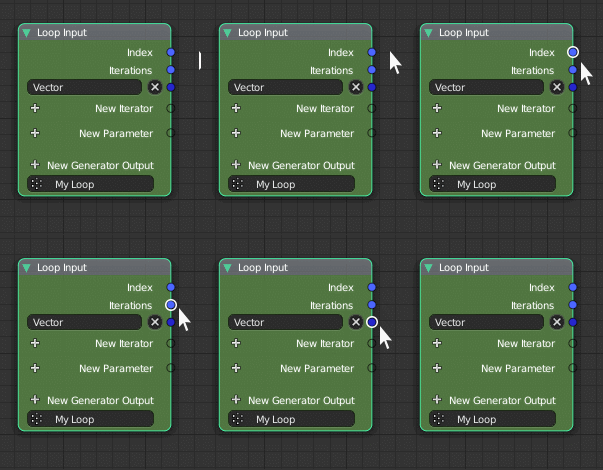
Pretty simple and self-explanatory with the gif provided.
96.7%
Development Status:
Open
Upvote29Downvote1
L
Luis.Burdallo
28 Jul 2018
6 Comments
L
Luis.BurdalloAuthor
Not sure why the website won't let you run gifs on the main picture/cover. I also think the hover area should be bigger than the socket dot which is tiny. Just to make it even easier to pick a socket to pull from. With higher DPI screens is even worse.
5
d
dpdpforlife
I truly am not trying to be rude, but...my mouse pointer is shaped like an arrow and that arrow is pointing at the thing that I aimed my mouse at. It just seams like a lot of work to make something highlight when I'm the person who put the pointer there, I don't need confirmation that it's there. My OS is already providing that confirmation by drawing an arrow that represents my mouse location.
s
simonstoschu
@dpdpforlife:
The point is that you can expand the clickable area this way without actually making the sockets bigger. Without an indicator you wouldn't know when your mouse is near enough to the socket to be in the clickable area.
2
L
Luis.BurdalloAuthor
@Simon Storl-Schulke:
Thanks for explaining the purpose of the proposal and how this makes things way easier especially when you are not zoomed in.
L
Luis.BurdalloAuthor
@dpdpforlife:
Honestly, we all know what we are pointing at. If you ever get to try what I am proposing you'll notice the difference, especially if you work with nodes a lot and you have complex networks where you prefer to be zoomed out a bit and it gets more difficult to hit the right place. High DPI screens suffer a lot more. It all depends on what you do and at which resolution.
d
dpdpforlife
@Simon Storl-Schulke:
Ok. That makes sense. Upvoted.

6 Comments
Not sure why the website won't let you run gifs on the main picture/cover. I also think the hover area should be bigger than the socket dot which is tiny. Just to make it even easier to pick a socket to pull from. With higher DPI screens is even worse.
I truly am not trying to be rude, but...my mouse pointer is shaped like an arrow and that arrow is pointing at the thing that I aimed my mouse at. It just seams like a lot of work to make something highlight when I'm the person who put the pointer there, I don't need confirmation that it's there. My OS is already providing that confirmation by drawing an arrow that represents my mouse location.
@dpdpforlife: The point is that you can expand the clickable area this way without actually making the sockets bigger. Without an indicator you wouldn't know when your mouse is near enough to the socket to be in the clickable area.
@Simon Storl-Schulke: Thanks for explaining the purpose of the proposal and how this makes things way easier especially when you are not zoomed in.
@dpdpforlife: Honestly, we all know what we are pointing at. If you ever get to try what I am proposing you'll notice the difference, especially if you work with nodes a lot and you have complex networks where you prefer to be zoomed out a bit and it gets more difficult to hit the right place. High DPI screens suffer a lot more. It all depends on what you do and at which resolution.
@Simon Storl-Schulke: Ok. That makes sense. Upvoted.