
Grease Pencil Eraser and Layers
Issue: I've accidentally erased things I didn't want to erase. (I'm posting here because this isn't really a bug; more a functionality change.)
Current: I've solved for now by locking or hiding layers I don't want to affect.
Request: Erase only on selected / active layers and according to hierarchy. (Note: Most graphic tools with layers behave this way and I think it is a good, intuitive norm.)
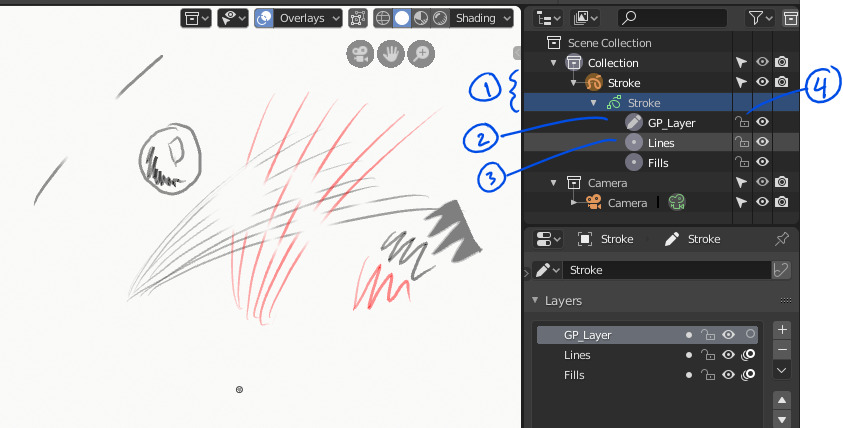
Example (refer to screenshot):
- #2 layer is selected. Even though #3 layer is unlocked (#4), not erasing would occur on it.
- If I multi-selected layers #2 and #3, then erasing would affect both.
- If I was selected on the Stroke parent somewhere (#1), then any unlocked layer would be affected by erasures.
BTW: I like selecting Stroke and being placed automatically in Edit mode, then Draw mode when a layer is selected.
I use a Wacom Cintiq with Grease Pencil (GP). I turn the stylus around to use the eraser. Sometimes I use the eraser tool w/ the nib.
Operating system: Windows-10-10.0.17763 64 Bits Blender: 2.80 (sub 54), branch: blender2.7, commit date: 2019-04-07 00:43
2 Comments
Under the down arrow menu next to add and remove layer, you can activate auto lock layers which will do what you want, although not with the added flexibility you describe.
This really should be the default though as it's pretty much undiscoverable.
It would be much better if it was always on and that pressing alt when erasing would erase all visible layers for example.
* @m.chaptel * : Thank you. I will try to remember to turn that on.