
3D-Viewport Visibility Modes Proposal
Here is my proposal for the <b>visibility modes </b> in the 3D-viewport. <b>They should be exposed in the viewport for easy use! </b>
As I know, there are two viewmodes in blender at the moment. a) Isolate Selected (only available per shortcut) b) Show Visible Objects
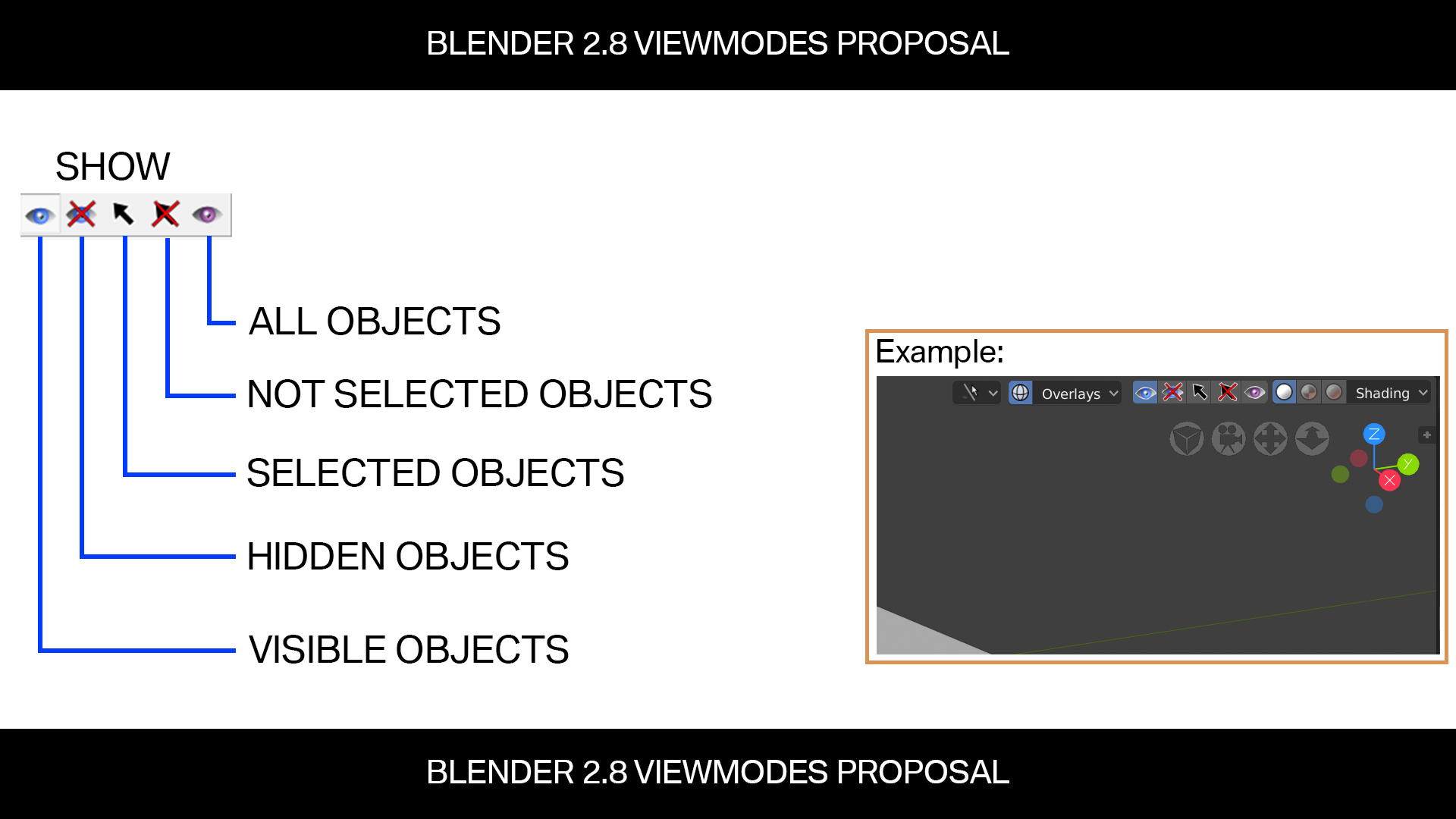
------------------------------------ <b>Here are my prefered viewmodes:</b> Show visible objects (the default). Show hidden objects. Show selected objects (isolate selected). Show not selected objects. Show all objects. ------------------------------------
They could be very usefull in lots of cases. Sometimes you have for example switched off the visibility for objects in the outliner. Your hierarchy is very large because of many objects. You want to see which objects are hidden from view. You press the <b>"Show hidden objects"-button</b>. You only see the objects that are hidden. You can then select the objects you want to unhide in the viewport... Another example is that you want to see all objects in the scene, but not unhiding all of them. You can toggle the <b>"Show all objects"-button</b>. In the moment in Blender you have to unhide all objects and then undo that operation to hide the objects again.
I hope I well explained the principle points of my thoughts. This visibility modes are only for the fast and interactive work in the 3D-viewport, not touching any object visiblility setting, for later rendering. For details see the attached Image.
2 Comments
it sound more intuitive for me to simpyl add one "invert" button, instead of 5 new ones..so showing the hidden objects = "invert visible".. because giving the option to "show" "hidden objects" short of conflicts within of itself..instead it's inverting which object's are hidden and which not
@michael lackner: I think you missunderstoud something. Every of this view modes can be used in different circumstances. It is used in a propritary 3D-Software I´m using at work every day. There is no conflict, for example the show hidden objects button shows the objects in the 3D-Viewport, that are hidden within the scene (the eye symbol off in the outliner). The only oder viewmode that is available in blender, is the isolate selected-mode. That is the same mode as my viewmode "show only selected objects". There is often a reason why objects are hidden in the scene but sometimes you are looking for an object that was hidden by mistake for instance.